TeamCity Snapshot dependencies for building Azure Infrastructure Resources. (Advice Required)

We are using TeamCity to build our Azure Infrastructure. We have created a build chain that runs Terraform and PowerShell code to deploy our platform into the cloud.This works great for the initial deployment but we have issues when we want to run updates to the build chain as we may want to update one component such as a virtual machines in the cloud but do not want to trigger other jobs in the future as a result of the update to the build configuration.
I understand that from a software development perspective this makes sense but for deploying resources (infrastructure) we would like the option to update single build configurations at any part of the build chain and have the option not to trigger a rebuild if required. Is this possible? Essentially we would like to have the option to deploy the entire build chain which we can force by setting the dependencies to rebuild but have the option to ignore dependencies by default and use a flag to enable them if possible.
We could wrap our build configurations in code that does not execute if a variable is set but wanted to know if there were nay native options in TeamCity that could be used.
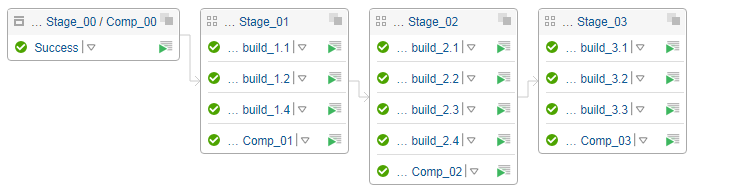
We are using composite builds for each stage of the chain which are linked with dependencies. An example of the structure is illustrated below.
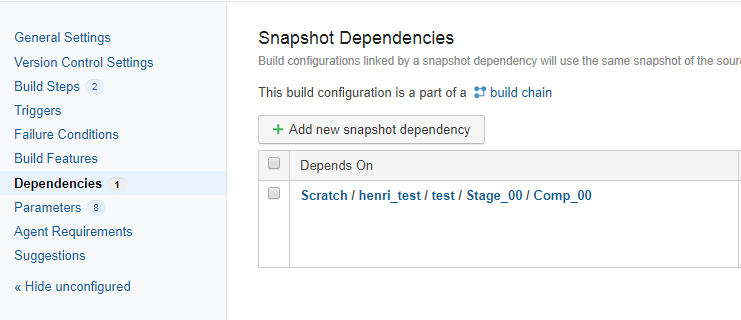
All the builds are dependencies of their respective composite builds in each project. See the illustration below for the dependency configuration of the composite build comp_01
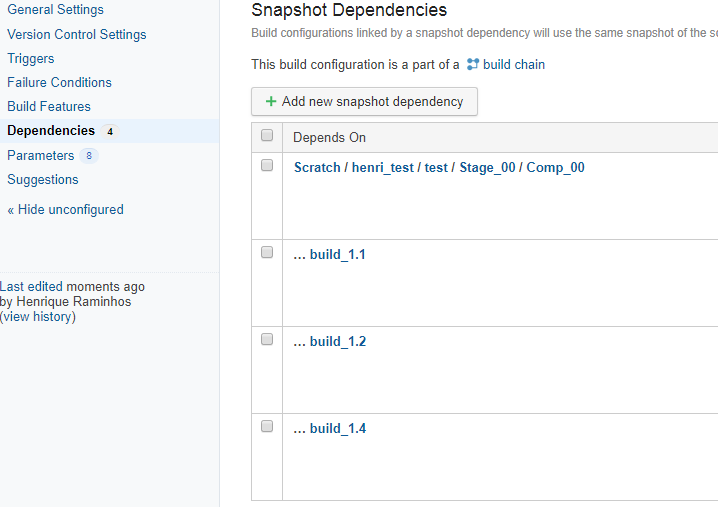
Also the separate builds either have dependencies on other builds in their project and if not will have a a dependency on the composite in the previous project see the illustration for build_1.2.
Essentially I would like to update 1.2 and at a later stage update 2.2 and not have it trigger off all the jobs again because 1.2 is an indirect dependency of 2.2 because of the structure of the pipeline.
We do have the option to restructure the pipeline into separate builds but then lose the ability to view a deployment end to end as a single build chain which is why we have structured the pipeline this way. We looked at using the rest API to call the next stage but them lost the ability to view the build chain as a whole.
Also we could make the build configuration idempotent where possible or wrap the build configuration as mentioned above but wanted to know what the best practice was for building infrastructure with TeamCity if any exist and if there any options that I was not aware of as I have limited experience with TeamCity.
Any tips or advice on possible solutions from anyone with experience in this area would be great.
Please sign in to leave a comment.
Hello,
When you write "update 1.2" I assume you mean running a new build in 1.2. Let me know if this is incorrect understanding.
Are you aware of the "Promote" action for a build (available from the Actions / Promote... on the build pages)? This will run the target build ensuring the current one is used as the dependency. Also, when starting a build you can select dependencies to use in the Run Custom Build dialog.
Important limitation here, however is that TeamCity ensures that all the builds in the chain are using the same sources snapshot and it's not easy at least to run a build in, say "2.2" on the current changes so that it uses a build of "1.2" which does not contain the all recent changes.
Thanks for the response.
That is correct, when I say update 1.2 I mean run a new build. I would be incrementing the version to 1.3 as an example.
I am aware if the dependency option but do not have the option to select the last snapshot as I only have rebuild or auto. The rebuild option will ensure that it is rerun no matter what the state of the snapshot dependency is and the auto will only rerun jobs that are out of sync with their changes in terms of snapshot dependencies.
I am looking at Promote and will see if that can help with my requirements.