Snapshot/Artifact Dependency (Depend on) List Not Populating

I am attempting to make a new build configuration with a dependency for the first time after upgrading from TC 8.1 to 2018.1.3. However, when "Add New Snapshot Dependency" dialog opens, it just sits there with "Loading data..." in the "Depend on" field and doesn't ever complete.
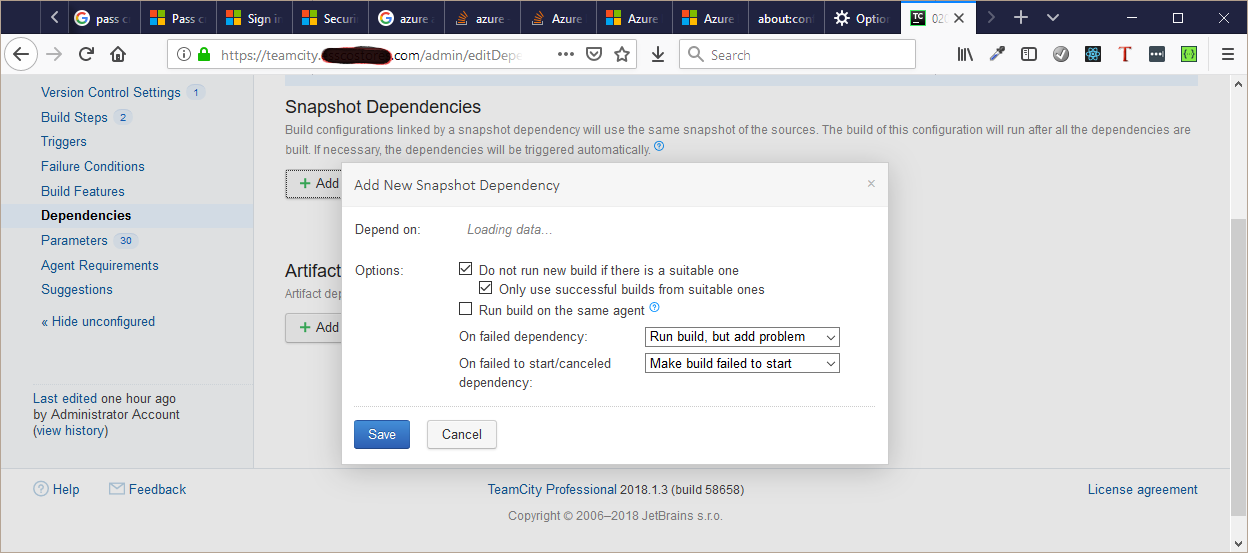
I can't seem to get it to populate at all. The strange thing is that all of the rest of the TeamCity UI seems to work fine.
What I have tried so far (without any change)
- I checked a few of the logs and don't see anything obvious.
- Restarted the TeamCity Windows Service and both build agents
- Rebooted the Windows Server 2016 server (both agents and the TC server are installed on it)
- Tried loading the list from build configurations that previously allowed me to add dependencies
- Logged in as the administrator
- Tried using Firefox 64.0 instead of Chrome 71.0.3578.98
- Disabled Azure Key Vault Plugin for TeamCity, which was recently installed
I would appreciate assistance on this as it is currently a blocking issue preventing me from configuring the builds the way they need to be configured. Is there a specific log message I should look for in a specific log that would be helpful to diagnose this?
Also, since this is a showstopper, is there a workaround for this that doesn't involve using this (broken) UI?
Please sign in to leave a comment.
Hi Shad,
we have had half a dozen recent reports about this, being related to an IIS proxy issue: https://youtrack.jetbrains.com/issue/TW-56218
Could you check that issue and see if the proposed solutions work for you as well?
Thanks for the response. As we were using IIS as a proxy for TeamCity, that looks to be the correct solution in my case. However, this worked in prior versions and it seems a bit odd that it is not being patched.
However, being that we are migrating to Azure and only had 2 build pipelines that had to be completely redone anyway, we ended up going with Azure DevOps to build them rather than dealing with (yet another) maintenance task for TeamCity. Maintaining an extra server and database, having TeamCity's annoying nag that there is constantly a new version to install (which we could never get to happen automatically and requires several hours of time to install manually), not to mention TeamCity not coming with the tools we use and having to configure them all is just overhead that we don't need.
TeamCity is great, but it is just overkill for our use case.