Starting virtual machine on demand

Hello,
I have a prepared a virtual machine in VMWare vCenter environment, and configured a TeamCity agent into that VM, as described in https://confluence.jetbrains.com/display/TCD10/TeamCity+Integration+with+Cloud+Solutions#TeamCityIntegrationwithCloudSolutions-PreparingavirtualmachinewithaninstalledTeamCityagent , and captured image (template) of that. When I clone and start the VM, the agent shows up in TeamCity as expected. I have also set up Cloud Profile in TeamCity as described in https://confluence.jetbrains.com/display/TCD10/Agent+Cloud+Profile and added reference to my VM template with "+ Add image". Everything fine so far.
However I cannot figure how to set up things so that a specific build configuration in my TeamCity project would "use" that cloud profile, i.e. clone and start the VM and then use the agent which is readily set up in that VM. For specifying the agent I would use "Agent Requirements" and something like "teamcity.agent.name equals X", but how do I express that TeamCity must first clone and start the VM?
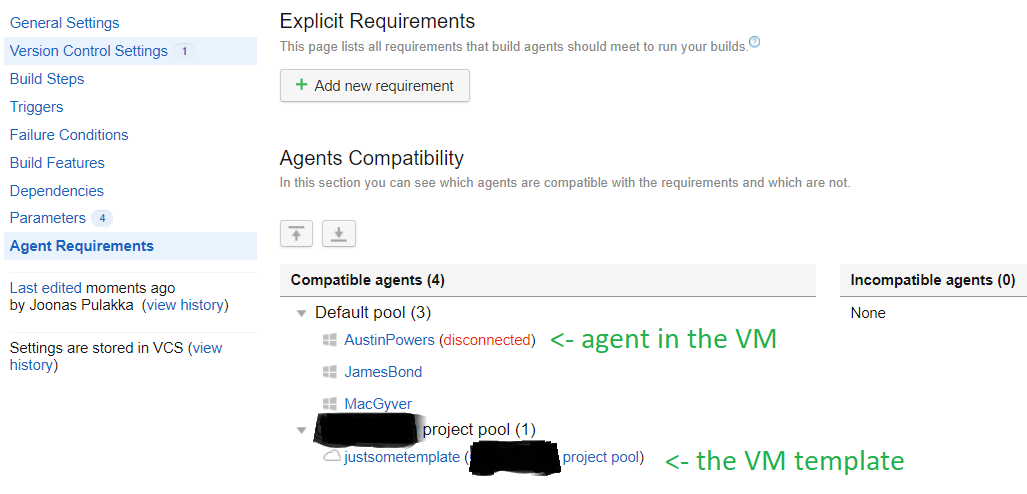
I see that my VM template is listed in the same listing as the agent:
Please sign in to leave a comment.
Hi Joonas,
If you want the build to only use the cloud agents, then simply remove all other pools from the project and ensure that the project still has access to the cloud pools.
If you launched an agent to ensure connectivity and left it registered, then it will be kept as an agent until you unauthorize it manually. The agents from the image will be started when needed, but if you already have connected agents which are compatible, they are probably going to be prioritized, as it's assumed that cloud agents could incur some costs, while the regular agents respond immediately and don't need to spin up a full VM for it..