Tests for Kotlin Configuration Scripts seems not to be starting

Hello everybody! Maybe someone can help.
I've added test for my Kotlin Configuration script(just like here https://blog.jetbrains.com/teamcity/2017/02/kotlin-configuration-scripts-testing-configuration-scripts/),
and I can't see the results of this test running. I've broke this test so it will fail every time, but I don't see any warnings in teamcity:
Current Status:
[14:17:59]: Changes from VCS are applied to project settings, last change 'my changes', revision 0f533acd3520a1e8b0098958a6fc99d98b213fb
First I pushed in repository new broken test, then pushed some changes in configuration script. So I expected that test will be running.
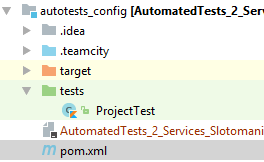
The problem may be in project structure:
Acording to the article(https://blog.jetbrains.com/teamcity/2017/02/kotlin-configuration-scripts-testing-configuration-scripts/), 'tests' folder should be outside
of the .teamcity folder. But I think that Teamcity doesn't see my 'tests' folder. On 'Versioned Settings' page in 'Change Log' section I can't see changes of 'tests' folder.
Please sign in to leave a comment.
Hi,
I think I see where the problem resides. It's explicitly stated that teamcity won't fetch dependencies and how to solve that problem, but I think that kind of misses the point: Unit testing, just like for other java/Kotlin tests is initially meant to be run locally, not on the "target" (in this case the server, although, of course, it can be automatized in CI by adding a build configuration to run the tests). In your scenario, when you run locally the test (just like any other normal project) you can run those tests to check that you are doing it right.
More settings validation options here: https://teamcity.jetbrains.com/app/dsl-documentation/jetbrains.build-server.configs.kotlin.v2017_2/index.html
Denis Lapuente, Thank you for your answer. I guess I really made wrong conclusion after reading the documentation. I've expected that teamcity will manage it somehow bu itself.