Questions building composite build

TC Version: 2017.2.4 (build 51228)
I am building my first composite build and have a few questions:
1. My composite configuration A depends on B. If B fails I want A to fail too. I configured the A -> B dependency this way:

So I expect the composite configuration to fail on its dependency failure. Why does it not?

UPDATE: worked this on around by changing the configuration's type from "Composite" to "Regular".
UPDATE2: it turned out, the "composite" configuration, which I made failing by changing its type from "Composite" to "Regular", actually failes because of some TeamCity error: "Incorrect string value: '\xF0\x9F\x90\x95\xF0\x9F...' for column 'problem_description' at row 1
SQL query: SQL DML: insert into build_problem (problem_description, build_state_id, problem_id) values (left(?, 4000), ?, ?) | PARAMETERS: "Snapshot dependency \"DEV :: Au...:: Run WebApi Tests\" failed", 106479, 1821
SQL exception: Incorrect string value: '\xF0\x9F\x90\x95\xF0\x9F...' for column 'problem_description' at row 1"
2. My composite configuration A depends on B, which depends on configurations C1, C2, C3, C4, all having different VCS roots. I want my composite build A to:
- trigger on changes to the branch `dev` of the VCS root of C1
- trigger on changes to the branch `master` of the VCS root of C2
- do not trigger on any changes of the VCS roots of C3 and C4
To achieve that I configured a VCS trigger for configuration A like this:

To me, it means the configuration will start on changes to branches `dev` OR `master` in EITHER VCS root of C1 OR C2. Is this correct? Is there a way to specify a branch`s VCS root to avoid such a behavior triggering the composite configuration of C2's VCS root's change to the branch `dev`?
3. On the configuration run dialog, there`s a branch-selection drop down:

It appears to contain all the branch names of the composite configuration`s dependencies` VCS roots. When I pick one of them, it looks like the branch name is used for all the VCS roots of all the dependencies. If there`s no branch with such a name, a default one is used. Is this correct?
4. While experimenting, I ran the configuration on a branch which doesn`t exists any more. How can I clean it out from the configuration's appearance?
UPDATE: the obsolete branch's build disappeared somehow.
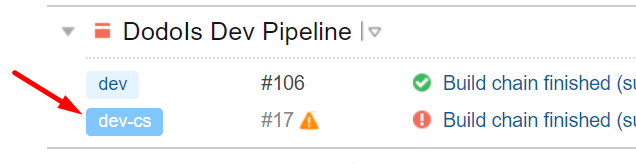
5. If my composite configurations A's dependency fails, I can only mark it "Fail to start", not "Failed". Because of this only successful builds appear on the main page:

whereas there's a failed build already, which is very important to me, as it meant to indicate there is (or there's no) problem with the branch `dev` of the VCS root.
Any ideas how I can mark the build failed and have it appear on the main page?
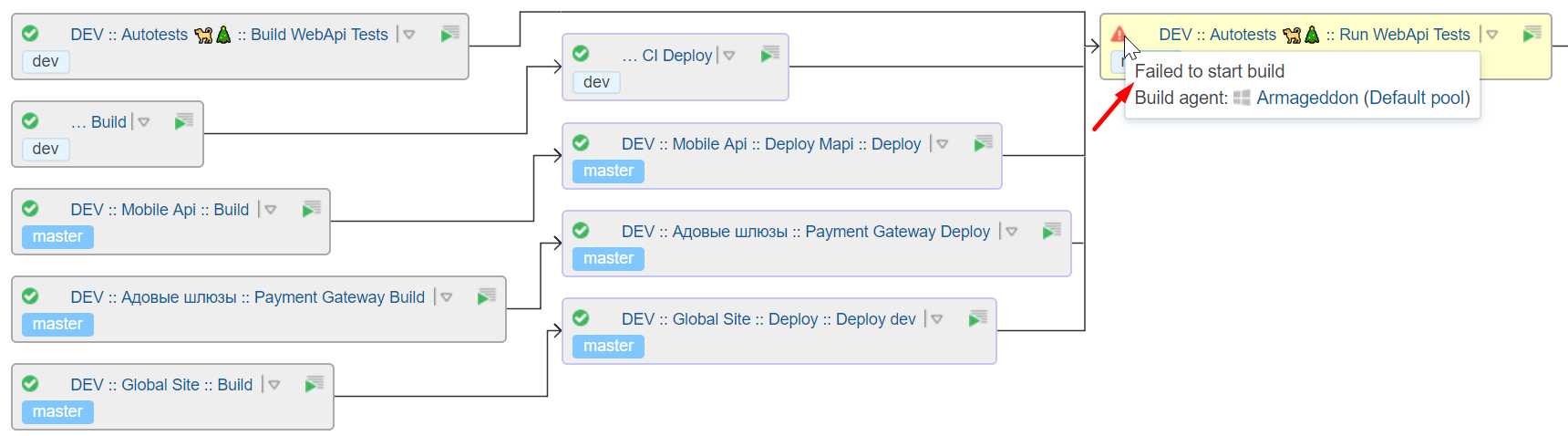
6. My my pipeline I have a build configuration which depends on others and does some work itself (runs tests). Just got this output: all the dependencies finished successfully, one of its own steps failed, but it was marked as "Failed to start", not "Failed":
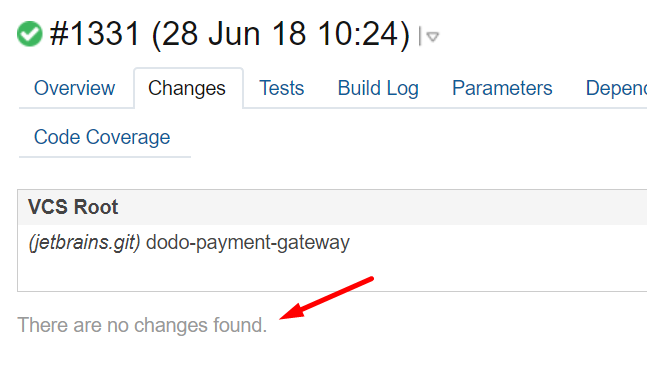
7. Just noticed that one of the depencies was't reused:


The dependant configuration:
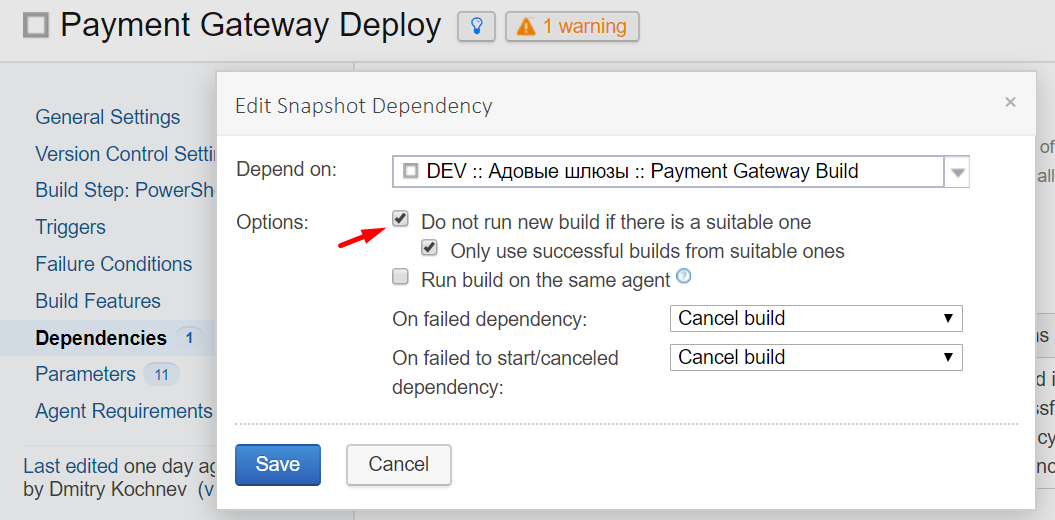
This definitely doesn't happen always, but I noticed such behavior a few times.
Regards,
Dmitry
Please sign in to leave a comment.
Hi Dmitry,
thanks for all your questions, I'll try to give a shot at answering them:
1- Composite builds are a specific type of builds that have a set of goals in mind: https://confluence.jetbrains.com/display/TCD18/Composite+Build+Configuration. Because of this special type some situations might not register properly at a given time, but if the dependency shows that it should be marked as failed to start, then either it should or the option shouldn't appear there.
The new problem looks like an encoding issue when trying to put text into the database. Which database and which encoding are you using?
2- This scenario is potentially problematic. When a build is started, a "branch name" is determined, based on the branch that triggered the build, this means that even if you accomplished your triggering scenario, a build triggered on "dev" for one root would try to pull dev from all VCS Roots, and would default back to the default branch on those that don't have a "dev" branch. Would this be your intention?
3- Yes, as I just described. More information on the concept of logical branches here: https://confluence.jetbrains.com/display/TCD18/Working+with+Feature+Branches#WorkingwithFeatureBranches-Logicalbranchname
4- That's also a default branch (note the darker blue). So first of all, remove it from the branch configurations. Then, after that, you will need to either delete the builds that refer to it or let them be cleaned up by the automated clean up process.
5- Again, composite builds are a special kind of build. They are not supposed to be able to fail but it is understood that under some circumstances they might. If you are using a composite build as a regular one, please change to regular.
6- That's a strange situation. We would probably need to see the build log of that build to understand what happened.
7- Suitable builds don't just mean that there is a finished successful build. There are other requirements that must be met: https://confluence.jetbrains.com/display/TCD18/Snapshot+Dependencies
Hi Denis,
Thanks a lot for your comments, but I still have some questions:
1. I read carefully the document by the link you provided, and I don't think our usage of Composite configuration contradicts the description. Actually, the description exactly matches our needs. But it doesn't cover error handling at all. I believe marking a composite configuration "failed" makes a lot of sense in some scenarios. For example, in my scenario: I change made to a dev branch -> I want to make sure all the tests still pass. And I want it to fail and alert me in case any part of the pipeline failed.
Anyway, now that we upgraded to TC 2018.1 (build 58245), it correclty fails in case its dependency's failure. I would also expect it to be marked "Failed to start" in case any of its dependency cancelled, but either way it's much better now.
Regardless the error, we use MySql 5.7, encoding UTF8MB4. But after the upgrage it seems to work OK.
2. I understand now how it works, and after giving it some thought I see that my intentional scenario would be quite complicated to configure. Never mind.
4. OK, thanks. Will try it out in case of the same issue in the future.
5. You say "[composite builds] are not supposed to be able to fail". Your link https://confluence.jetbrains.com/display/TCD18/Composite+Build+Configuration doesn't say anything about that. And, as I said above, I does make a lot of sense for it to fail in some scenarios. Personally, I'd love to have all the features of Composite configuration + it failing it case of its dependency's failure. So, that would be a feature request?
6. Maybe it's gone after the upgrage, will see.
7. Yeah, we figured it out the reason was in passing parameters with asterisk (*) from the very root composite configuration.
Hi,
I'm glad to hear that the upgrade helped with several issues.
1 and 5- I think I worded this poorly, sorry. The idea is that a composite build, by itself, doesn't run any build step, which are what determines whether a build fails or succeeds. As composite builds cannot run those steps, they inherently cannot fail by themselves. This said, as far as I can tell, a composite build with failing dependencies will fail if you select the "run build, but add problem" option on what to do on a failed dependency. Could you please check?
For canceled, a feature request already exists: https://youtrack.jetbrains.com/issue/TW-53349
Hi Dennis,
Right, this option seems to work exactly as I need.
Now that I spent quite some time playing around with it, and you explaned what it means under the hood of TC for a build to "fail", I can see the logic. But for a newcomer it's unobvious.
Anyway, thanks a lot!