Unable to update Teamcity Tools

We are using TeamCity Professional 2025.07 Build 197242
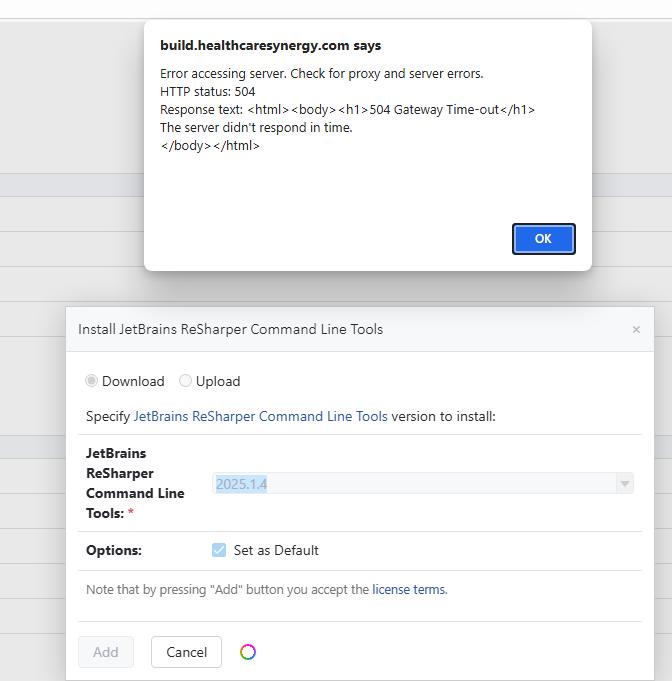
When trying to update the Resharper Command Line Tools we get an error 504 Gateway Time-out
I tried downloading the nupkg file manually and then upload it and received the same error.
Here is a screenshot of the issue:
Please sign in to leave a comment.
It seems that your TeamCity server is not able to make a connection to the URL to retrieve the tools for some reason. As an alternative, you can download the tool on another computer and upload it to your TeamCity server. The ReSharper Command Line Tools are available for download here: https://www.jetbrains.com/resharper/download/other.html. Download the version of the tools you need and upload them by clicking on the “Upload” radio button.
I tried doing that and I get the same error message.
Do you get the error when you are attempting to download the file on another workstation? Or are you getting an error when uploading the file to the TeamCity server?
In the case that you're getting an error while attempting to download the file on another workstation, it seems there is some network restriction that is preventing you from reaching our servers. Are you able to download the file from a computer on a different network? Or would you be able to request your network administrator to investigate the blockage?
Thanks,
Eric
If I try to use the download it errors out. If I manually download the nuget package from nuget.org and then try to upload it I get the same error message.
Thanks,
Eric
Thanks,
Eric
How do I share those. Do I just attach them to this post?
Upload id: 2025_08_13_FdGrTBwzq9yUctpPEGzhep (files: catalina.2025-06-17.log and 8 more)
After examining the provided logs, I don't see any information within them that would indicate the request made it to the TeamCity server.
Could you please try uploading the file to the TeamCity server directly from a browser on the TeamCity server machine itself using http://localhost?