Commit Status Publisher Error with Bitbucket

Mikhail helped me out and I finally got to root cause. The root cause is me not understanding the screens.
The commit status publisher asks for a Bitbucket Username and Bitbucket App Password. I misinterpreted that to be my Atlassian username and Atlassian User Password.
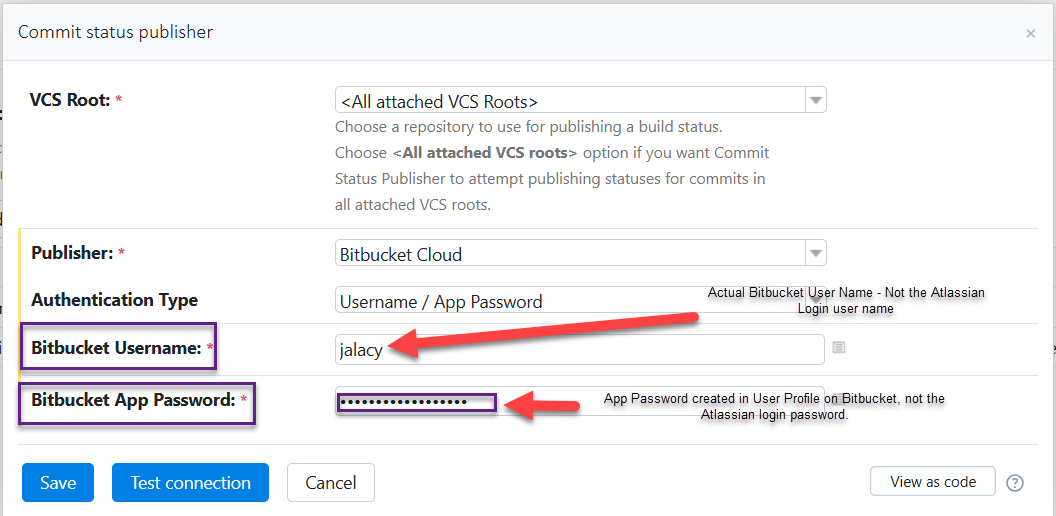
I also misinterpreted what the password was. It's the string of characters generated in Bitbucket Profile that you have to keep secret, not the Atlassian login password.
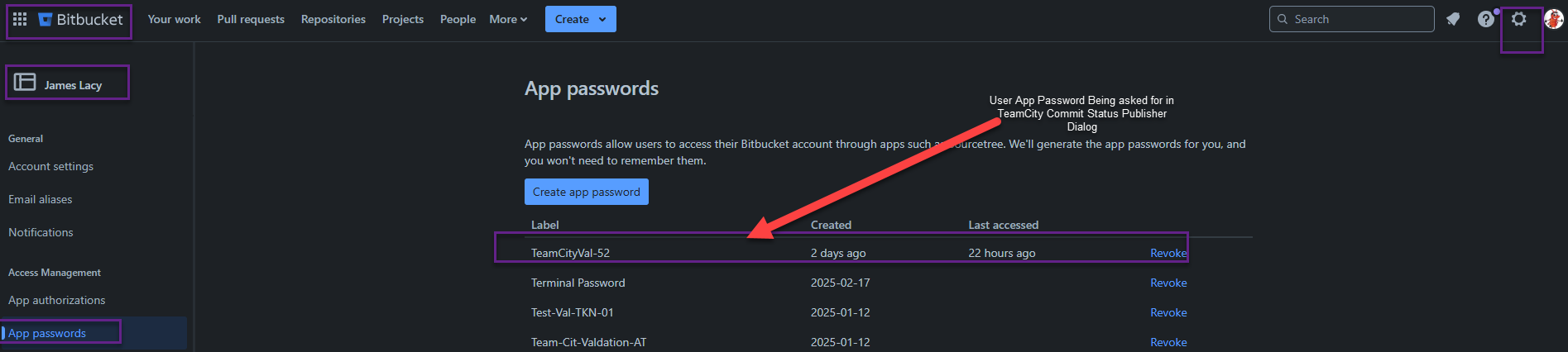
SSo, ok. I'm a boomer. I admit my mistakes.
Please sign in to leave a comment.
Hi James,
It looks like you’ve got the correct setup now!
By the way, the "Use VCS root credentials" option is specifically designed for VCS roots that authenticate using tokens (either static/personal or refreshable/OAuth). This allows repositories to be fetched over HTTP(S) without requiring a username and password.
You also can get the detailed information about how to configure Commit Status Publisher in our official document: Commit Status Publisher – Bitbucket Cloud.
Best Regards,
Tom