Composite builds fail to clean

Hello!
We recently added “Build All” composite build chains for all our projects. And have now realized that none of the composite builds have been cleaning their dependency builds' shared artifacts registered to the composite build. This has mean more than a terabyte of data has stuck around which should have been cleaned out.
Both the composite and the regular builds added as dependencies to the composite all inherit the same clean up rules from the project they are added to.
This is what our rules have been set to on one project which was cleaning individual regular builds fine before. the composite for this project is inheriting these exact rules.
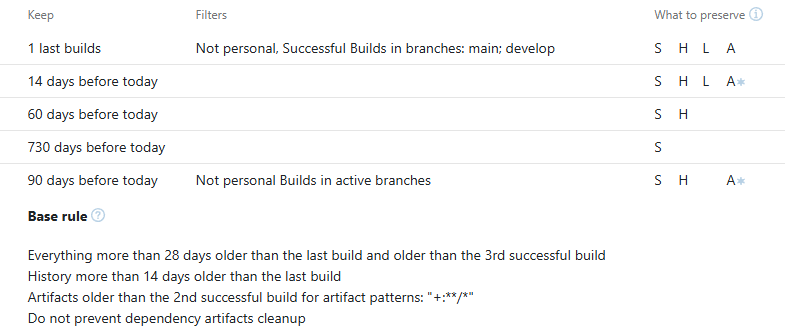
Could any one please explain what we might be doing wrong?
Please sign in to leave a comment.
Hi Nico,
Clean-ups do not affect the following build types:
• pinned builds
• builds used as an artifact of snapshot dependency in other builds when the " Prevent clean-up" option for dependencies is enabled in the build configuration. Such builds are marked with the icon in the build history list
• builds of recently removed build configurations
These builds retain all their data after server clean-up routines. For more details, please refer to TeamCity Data Clean-Up.
To investigate why a build was not removed, label it with the diagnostics:cleanup tag. During clean-up, TeamCity identifies all tagged builds and generates a detailed report explaining why these builds were kept. This report is saved as a build artifact to the hidden .teamcity/cleanup/ directory.
Could you please follow the Cleanup Diagnostics to enable cleanup diagnostics for one of the builds and provide the report to us? Files can be uploaded via https://uploads.jetbrains.com/. Please let us know the exact id after the upload.
After generating the report, TeamCity removes the diagnostics:cleanup tag from the build.
Best Regards,
Tom
Hi Tom,
I'm one of Nico's colleagues, just filling in while he's away.
Thank you for the hint on diagnostics:cleanup. I had looked for such a feature a while back, but it seems like at the time it was not present in the documentation. We have subsequently updated our TC server (which was a couple of versions out of date and just missed it) in order to try out the diagnostics.
I have uploaded an archive of (slightly redacted) diagnostic reports for a build and the corresponding composite, with the ID below:
Upload id: 2025_03_03_6Nksk4KdXf27th6tzsE9Jz (file: Reports.zip)
By my reading, it claims, as we experience, that the artifacts of the build are held by the composite build, even though I would expect the composite build to NOT do this based on our settings.
If helpful, we generate the cleanup rules via some fairly abstract kotlin functions shared across several projects. This unfortunately makes it a bit complex to share. However, the cleanup rules XML it generates for the project in question looks like this:
We have had other dependant tasks, such as tests and deployment tasks, that also have the same configuration and have never caused artifacts not to be cleaned up before. Do composite builds (that themselves publish the artifacts for convenience) work differently?
From the log file, I found the following entry:
"Updating directive to preserve 'Everything' for build as it is a dependency of a composite build with ID 526013, for which artifacts should be preserved."
This indicates that this build is a dependency of composite build 526013, and as a result, the artifact data will be preserved despite being eligible for cleanup.
Since composite builds do not have their own artifacts, the artifact cleanup policies must be configured in the dependency builds instead.
For more detailed information, please refer to https://www.jetbrains.com/help/teamcity/composite-build-configuration.html#Artifacts.
Best Regards,
Tom
Hi Tom,
I'm afraid I don't entirely understand your suggestion. Both our composite builds and the original builds have the exact same cleanup rules, as described above by myself and Nico, all inherited from the project level, and it includes “Do not prevent artifact cleanup”. My understanding is that this setup is correct, and is what you're describing above.
How can we configure our setup differently so that the composite build does not prevent cleanup?
Hi,
Apologies for the delayed response and any confusion. Composite builds do not have their own artifacts; the artifact cleanup policies configured in the dependency builds are sufficient.
To do further investigation, could you please share a screenshot of how you have configured the Artifact Dependencies in the composite build configuration?
Additionally, please provide screenshots of the build Overview pages for both the composite build configuration and its dependent build. For more details, please refer to the screenshot.
Hi Tom,
Apologies for the delay.
Here are the screenshots as requested, we have blocked out some private information.
From your shared screenshots, it seems that no build artifacts are available for "Build All" configuration.
If possible, could you please share a screenshot showing the artifacts that should have been removed but weren't? Files can be uploaded via https://uploads.jetbrains.com/. Please let us know the exact id after the upload.
Best Regards,
Tom
Hi Tom,
Apologies for the delay again, we had to re-enable our artifact publishing for the composite and wait to get to a point where we expect artifacts should have been cleaned. you can see these in our shared files here Upload id: 2025_03_26_UzUYqBCWLnDtqva1MQtcR6 (files: build-artifacts.png, cleanup-rules.png)
I have added the diagnostics:cleanup tag to that particular chain, will add some more screenshots regarding it once it gets processed.
Please capture a screenshot of build Overview pages that contain build artifacts which are available for "Build All" configuration.
Take your time and wait for your updates.
Best Regards,
Tom
Hi Tom,
I have sent you a couple of examples on 2025_03_28_SaTPJjpFCom8of9oFPiTBq
Hi Tom,
Once again our hard-drive is fulling up with terabytes of un-cleaned artifacts.
Please see more info in 2025_04_02_549pqLzY75k89E97VR8Rse
There are two builds shown:
- 66259 - is not a composite dependency, and has the diagnostics:cleanup tag, but is not picked up by the cleanup process, and produces no cleanup report. This is not the only build we have observed which is completely missed by cleanup, please can you address this?
- 80891 - is a composite dependency, and correctly processed the diagnostics:cleanup tag, and produces the cleanup report I have attached in 2025_04_02_549pqLzY75k89E97VR8Rse. The report states “Updating directive to preserve 'Everything' for build as it is a dependency of a composite build with id 530535 for which artifacts should be preserved.” Which is not what we want, ever, how can we disable this behavior please?
Please also note: composites do not even need to register dependency artifacts for publishing at all, just being part of a composite at all makes our builds retain their artifacts forever, which is obviously not good.
Hi Nico,
Thanks for your detailed information.
> 66259 - is not a composite dependency and has the diagnostics:cleanup tag, but is not picked up by the cleanup process, and produces no cleanup report. This is not the only build we have observed which is completely missed by cleanup, please can you address this?
Please ensure that build 66259 is not affected by any of the following scenarios:
- Pinned builds
- Builds used as an artifact of a snapshot dependency in other builds, where the "Prevent clean-up" option is enabled in the build configuration (Reference). Such builds are marked with a link icon in the build history list.
These builds retain all their data after the server’s cleanup routines. Additionally, could you provide more details about build 66259, such as:
- A screenshot of 66259 in the build configuration overview page
- Build chain information for 66259
> The report states “Updating directive to preserve 'Everything' for build as it is a dependency of a composite build with id 530535 for which artifacts should be preserved.” Which is not what we want, ever, how can we disable this behavior please?
Build 80891 is listed as a dependency of composite build 530535, meaning that as long as 530535 is not removed, 80891 will also be retained. If you want the artifacts to be removed, ensure that 80891 is no longer being used by any other builds. From the provided screenshots, 80891 appears to be a snapshot of Build All #30. Such builds are marked with a link icon in the build history list. In this case it will be not cleanup. Please adjust the cleanup policy for Configuration "Build All" to ensure that build 530535 is removed before its dependency artifacts are cleaned up.
Best Regards,
Tom
Hi Tom,
I'm afraid we seem to be talking past each other at this point, so please allow me to clarify.
ALL of our composite builds have the same cleanup policy, as I mentioned in this comment. The cleanup policy is described in a comment above. They all have ‘Do not prevent artifact cleanup’ set, as do all of our actual builds. Indeed, we have other deployment configurations that have exactly the same rules as well. Those display with a link icon in the TeamCity UI, but do not prevent cleanup, exactly as we expect. This seems inconsistent with what you're saying above, where you claim all builds with a link will never be cleaned up. We absolutely have builds with links (dependents of a deploy task) that get cleaned up, as demonstrated in the following screenshot. One of hundreds of examples.
We ONLY experience the problem we describe above with builds that are triggered as part of a composite build chain. However, I expect composite builds to behave exactly the same as deploy builds, however in our experience they do not.
Here is the screenshot of the clean up rules for one of our projects. All other projects are the same (though may have slightly different exact periods)/
Hi Claudio,
> We ONLY experience the problem we describe above with builds that are triggered as part of a composite build chain. However, I expect composite builds to behave exactly the same as deploy builds, however in our experience they do not.
I will try to reproduce what you have described on my side. As making the cleanup rule effective will need more time. If there is any update, I will let you know. Thanks for your patience and cooperation.
Best Regards,
Tom
I was unable to reproduce the issue on my side — in my testing, the composite build artifacts are cleaned up as expected.
To avoid any misunderstanding or missing details on my part, could you please create a bug report on our YouTrack (https://youtrack.jetbrains.com/issues/TW) with detailed reproduction steps?
We truly value your input and appreciate your efforts in helping us improve TeamCity.
Best Regards,
Tom