can't build <default branch> because teamcity.build.branch.is_default Implicit requirements

First of all let me explain my configuration. I've a setup like this, my VCS configuration has:
Default branch: master
Branch specificaiton: +:refs/pulls/(*/merge)
I use this branch specification in order to test pull requests as explained here:
http://blogs.jetbrains.com/teamcity/2013/02/06/automatically-building-pull-requests-from-github-with-teamcity/
and it works.
My build configuration has an step "push to heroku" which is a command line script as follows:
if [ "%teamcity.build.branch.is_default%" = "true" ]; then
git push git@heroku.com:my-heroku-thing.git master
fi
as you can see here, I publish only if the branch is the default one.
So, the problem I have now is that if I choose branch <Default Branch> from Teamcity UI, the build is queued but it is not run because there isn't any compatible agent as shown here:
If I select "master" from the list, the build is run, but %teamcity.build.branch.is_default% is FALSE.
What am I doing wrong?
regards
Please sign in to leave a comment.
If fixed it by using:
if [ "%teamcity.build.branch%" = "refs/heads/master" ]; then
git push git@heroku.com:mything.git master
fi
Hi Jose
Which TeamCity version do you use?
Do you have master selected as a default branch? How then do you switch between a default branch and master?
Could you please post a couple of screenshots with VCS root settings and branch selector on build configuration overview page.
Thanks
Hi I have installed 7.1.5. Here is an screenshot:
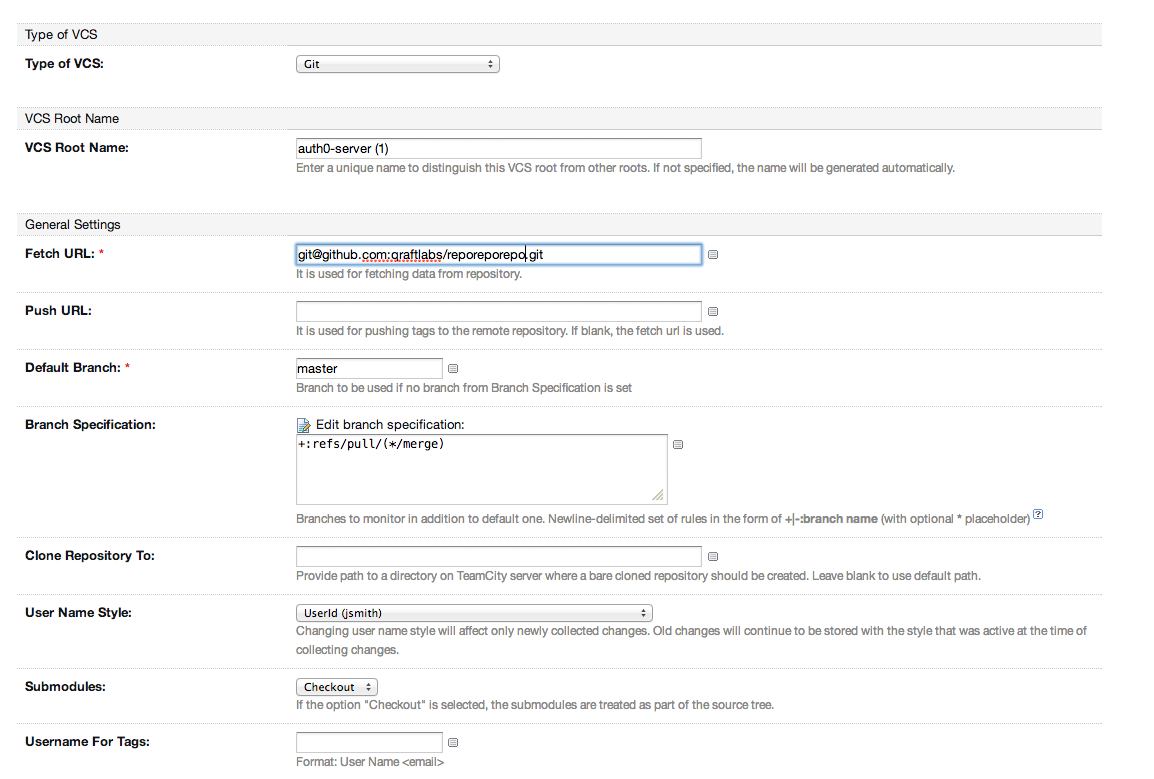
It seems that the variable "teamcity.build.branch.is_default" is not set for some cases thus Teamcity can't find any agent to run the build. I have changed to use %teamcity.build.branch% and now everything seems to work.
Hi Jose
Could you please:
Thanks!