Name of generated Perforce client spec

Hi,
Is there a parameter for the name of the automatically generated perforce client spec that gets created if you manually specify the mapping?
Regards
Paul
Please sign in to leave a comment.
Hi Paul,
There is a parameter which allows to specify a prefix for the generated perforce client name.
For details, please see http://youtrack.jetbrains.com/issue/TW-13557
Would it solve your need?
Regards,
KIR
Hi,
Ideally I need the full name of the automatically generated client name which doesnt seem to be provided anywhere.
Regards
Paul
Hi Paul,
It looks like I misunderstood the question. On agent side, in your build script, you should be able to
take the name of the generated client from env.P4CLIENT variable.
You can also see other parameters of the build on the "Build Parameters" tab on build results page.
Hope this helps,
KIR
Hello,
I am facing with the same issue. Note that I am new to teamcity, still evaluating it. The layout I want to use is to have a common perforce vcs root shared with all the build configs with agent-side checkout mode and specifying various checkout rules in each build configuration to get the right trees during checkout for each build config. This is resulting in generating p4 client workspaces on the fly by teamcity with naming convention TC_p4_hostname_vcs__ID_ID_ID.
If, for example I need to interact with perforce in the build script (example: commit back a version.h, commit back a binary file (note I am aware of the artifact storing feature very well, but I still need to commit back binaries into perforce) I need the name of this generated client so I can execute p4 -c generated_client_name edit/submit/whatever.
The problem is that I don't have any env.P4CLIENT variable on the agent machine, so this answer above does not solve my problem. I really need the reference to the name of the generated p4client workspace, and the exact one. Imagine the situation when I have 2 or more build agents on the same host, each doing stuff with different p4workspaces. My original idea was to simply look up the name with "p4 clients | grep TC_p4_%hostname%_vcs" but this will return more than one if I have more than one agent on the machine.
How can I get a reference to the generated name?
Hello Daniel,
In your build script, you should be able to pick the corresponding Perforce client name from the 'P4CLIENT' environment variable.
Does it work? If no, how your build script looks like, which build runner do you use?
Regards,
KIR
I simply tried to echo out the value of the environment variable you suggested in a command line runner (only one line):
echo "P4Client is = %env.P4CLIENT%
this made my build agent incompatible with the reason:
Which tells me this variable is not defined (I cannot even see it on the suggested variable list when editing the command line runner).
Daniel, for a shell script you should use variable %P4CLIENT% instead.
Maxim, thank you for the reply. I've tried changing the variable name to %P4CLIENT%, but no luck, same thing. Build is not running due:
No enabled compatible agents for this build configuration.
I don't know what I am doing wrong, or when this variable gets defined. I need the value of this (the name, bold below. copied from the agent's logfile):
[2013-05-02 10:53:31,183] INFO - jetbrains.buildServer.VCS.P4 - Creating/updating Perforce client specification:
Client: TC_p4_webserver_vcs__3089254490730396499_222bb2857a42476c_68a39e55dd90cfae
Owner: teamcity
Description:
Created by TeamCity for user teamcity.
Root: C:\Teamcity\BuildAgent\work\222bb2857a42476c
Options: noallwrite clobber nocompress unlocked nomodtime normdir
SubmitOptions: revertunchanged
LineEnd: local
View:
..
If I define P4CLIENT with an empty string under build parameters, teamcity lets me run the build configuration, but I don't have the value filled during script execution. I really don't get this.
In the log, it says P4Client environment variable is set to the value what I need:
more info about my problem:
command line runner IF custom script is selected and script is injected directly in the edit box
echo %P4CLIENT% - Can't run: teamcity does not allow to start the build due to agent incompatibility
echo %env.P4CLIENT% - Can't run: teamcity does not allow to start the build due to agent incompatibility
command line runner IF executable with parameters is selected and path to the script is correctly specified
#inside the script I can simply referencing %P4CLIENT% - WORKS
powershell runner:
write-host $env:P4CLIENT - WORKS
nant runner
<echo message="${environment:get-variable('P4CLIENT')}" /> - WORKS
<echo message="${env.P4CLIENT}" /> - FAILS (somewhere I read this should be working, ie teamcity should feed NAnt with all the params, but it isn't)
<echo message="%env.P4CLIENT%" /> - Can't run: teamcity does not allow to start the build due to agent incompatibility
<echo message="%P4CLIENT%" /> - Can't run: teamcity does not allow to start the build due to agent incompatibility
+++
so, it is working well if I use external scripts (which is the intended thing in the future), but it is really annoying that I have this agent incompatibility thing if I simply enter the script text in the edit box as I tried in the first place.
I am wondering if this is a BUG or not. (NAnt properties don't get filled - this is yet another story)
Hello Daniel,
Thanks for the investigation and letting us know about the results.
I believe the incompatibility issue is a bug, and I'd appreciate if you file it to http://youtrack.jetbrains.com/issues/TW (to get notified when it is fixed)
Sorry for the problem.
Regards,
KIR
thanks, I posted it. As it turned out, there are cases (when it did not work, see above) when I simply need to escape it ;)))
%%P4CLIENT%% works well in those cases.
One more question please.
It seems P4CLIENT, P4USER and P4PORT are only passed as environment variables if checkout on agent or checkout on server is enabled. The env vars are not passed if 'do not checkout automatically' is selected in the vcs settings under the build configuration settings.
However, I need them because I want to control p4 operations manually for some builds, so I don't want teamcity to do the checkout but I need those variables. How can I do this? Thanks.
Hello Daniel,
When you choose "do not checkout automatically", TeamCity's perforce support is not involved into checkout process at all -
so there is simply no P4CLIENT to use, and no corresponding variable.
Regards,
KIR
Okay, it makes sense, after all.
I have the same issue using TC 8.0.1 but I'm using the option VCS checkout mode: "Automatically on agent (if supported by VCS roots)"
To summarise what I'm doing, I've got a command line shell script added as the first build step. As soon as it tries to use the p4 executable I get the error "Error: Perforce password (P4PASSWD) invalid or unset." In the TC build log though I can see it has successfully ran p4 commands itself.
Here's the build log:
Updating sources: agent side checkout (24s)
[07:36:28][Updating sources] VCS Root: PROJECT_Main (19s)
[07:36:28][VCS Root: PROJECT_Main] revision: 974461
[07:36:28][VCS Root: PROJECT_Main] Updating sources for root 'PROJECT_Main', revision/label: @974461 (19s)
[07:36:28][Updating sources for root 'PROJECT_Main', revision/label: @974461] Will use p4 executable from 'p4'
[07:36:37][Updating sources for root 'PROJECT_Main', revision/label: @974461] Running 'p4 sync'
If I try to pass env.P4USER etc. as paramters to my shell script TC says the agent isn't compatible.
What I really need is one of these 3 options to work:
1 - My shell script to use the same environment as the TC one that gets the latest from perforce (assuming it doesn't logout of perforce)
2 - For TC to have P4 parameters (perhaps the ticket too) so I can pass them into a p4 login command
3 - For TC to create a valid P4 session in the environment it's created before it executes my shell script.
If anyone can think of a workaround then I'll be super happy!
Thanks,
Mark
Hello Mark,
How do you run p4 command? What your script looks like?
How do you use environment variables to get values for variables P4USER etc?
Regards,
KIR
Hi KIR,
I'm launching a python script from a shell script. I launch the p4 executable with the python function subprocess.Popen.
P4USER etc. aren't set in the environment (at least I don't see them set) so I'm setting them with the python code:
os.environ[ 'P4USER' ] = p4User
os.system( "export P4USER=%s" % p4User )
I'm currently passing in the username and password as parameters of my build step, having the same values as my VCS root.
I extracted the TC client spec today through the p4 info command but it doesn't seem valid when it gets to my build step, though the name matches what TC is using.
I get this perforce error:
command:
p4 -ztag where "<LOCAL_PATH>"
Error: <LOCAL_PATH> - file(s) not in client view
The LOCAL_PATH is in the client view as it's the same path as the script is running and the same location as TC synced it to.
Also the python script runs completely fine outside of TC.
Thanks,
Mark
Hello Mark,
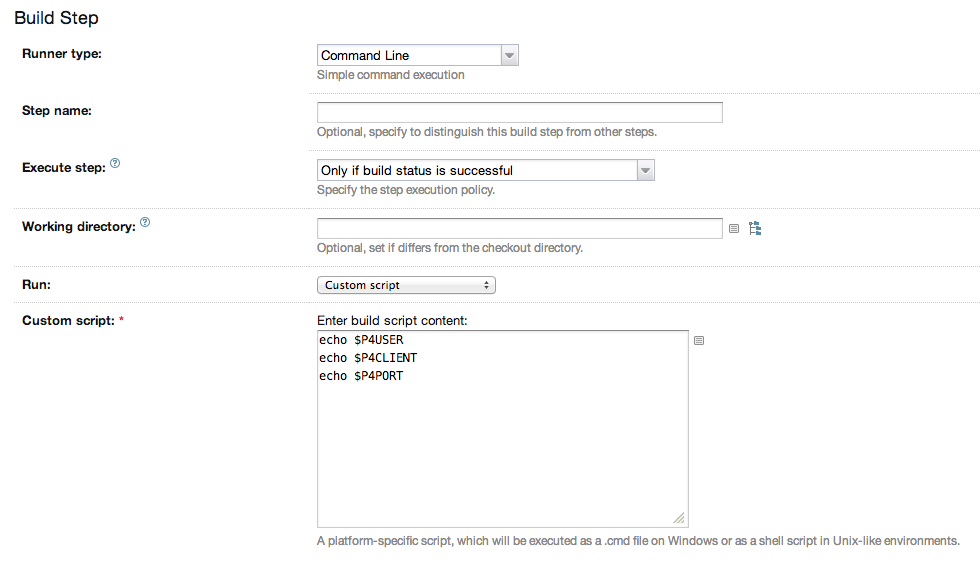
I've just tried a custom build with the following settings (see the picture below), and it prints P4* variables provided by TeamCity as expected (but, TeamCity doesn't pass P4PASSWORD - for security reasons).
Of course, this works only for "checkout on agent" checkout mode.
I.e. TeamCity correctly passes environment variables to the build process.
Hope, this helps,
KIR
Hi KIR,
Thanks for the help, your reply got me to find out the real issue. Once I knew that P4USER, P4CLIENT and P4PORT were set I just set P4PASSWD in my script. I then had an issue with the client mapping with the "p4 where" command that was causing an issue. If I gave it the root directory as a local path as opposed to a perforce path it came out with an error. Apologies as this was completely unrelated to TC.
Again, thanks for the help. I've now got it all working!
Mark
Hi Mark,
I'm glad you've found the solution :)
Good luck,
KIR