connect to VCS clone with external client

So I'm fairly new to TeamCity, I've setup a server and a project, got it to clone our repo, and ran the first builds...
Our build process can sometimes generate a fair amount of diffs in versioned files (it's a Unity project with lots of AssetPostprocessors that can sometimes change the metas), and I'd like to track those.
So my question is, can I connect to the agent's repo with a desktop client (we're on Mercurial with TortoiseHG) to view the changes to the working directory? I've located the clone/agent's directory, but there's no .hg folder so Tortoise doesn't consider it a repo. I don't understand how TeamCity tracks this clone...
Please sign in to leave a comment.
Hi Benoit,
There are two checkout modes in TeamCity.
Please read more: https://confluence.jetbrains.com/display/TCD9/VCS+Checkout+Mode
Hi Alina, thanks for the answer.
Yes I saw that regarding Git on StackOverflow, I wasn't sure it applied to Mercurial (the docs seem to confirm it, thanks for the link!).
Unfortunately, I tried changing the setting on my configuration, and it didn't change anything, the .hg is still not here. I found it on the server though (just the .hg repo, without the actual working copy files... I supposed it's the intended behaviour).
Can this setting be changed after the fact like this? or do I have to create a new agent or VCS source or something in my configuration?
OK, so I created a new VCS root from scratch, and now I do have the .hg... and when I went back to the agent's directory, I saw I now had 3 repos! the original one without the .hg, and 2 new ones with the .hg.
I think I figured out what happened: when I changed the settings of the existing one, it created a new directory but didn't change the existing one, so I didn't notice it.
Benoit,
Sorry for delay. Yes, you are right. The checkout directory is changed if the VCS settings are changed. Please read more here: https://confluence.jetbrains.com/display/TCD9/Build+Checkout+Directory
Ah thanks for the link (docs are very deep so I'm still figuring my way around them ;)), that answer another question I had: sometimes my checkout directory is just wiped, which is a pain because it's very big (10 GB), and takes forever to rebuild from scratch (it's a Unity project so it has to build the Library etc).
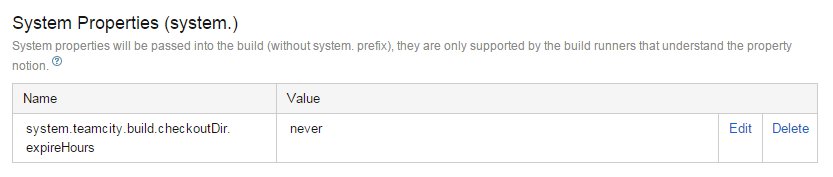
So apparently this is by design (Automatic Checkout Directory Cleaning) but I don't really understand how to edit the parameter. Is there a way to view/edit all the current parameters that don't have a specific UI page?
I did this, but it feels a bit like a shot in the dark: