Same default branch shown twice

We have a build configuration that is dedicated to the main branch of development, which is called "develop" in other organization (comparable with "trunk" or "master" in other organizations).
Our VCS root for this configuration is configured as follows: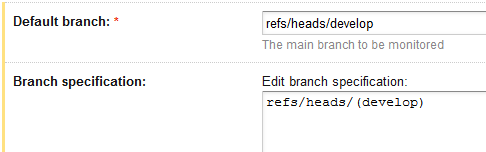
The trigger of that build configuration is very straightforward as follows: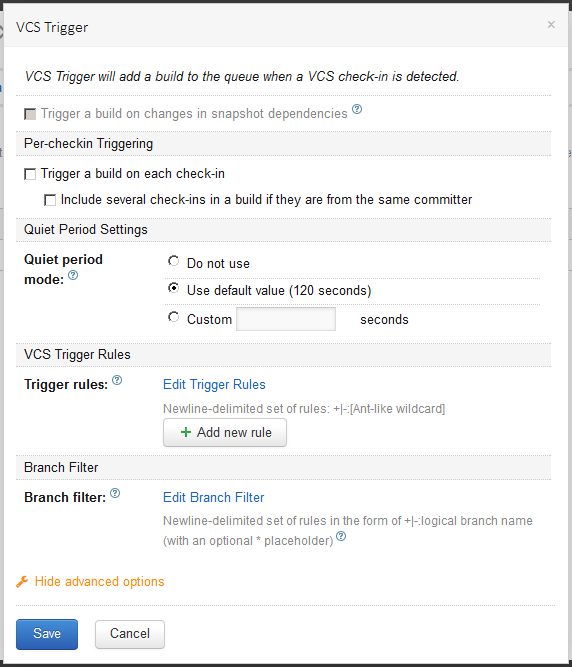
Now, this build configuration is not new, and we've messed around a bit with it, and now the build history has gotten faulty, as follows: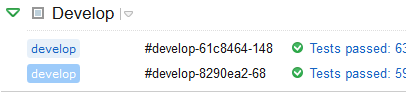
I think the light blue one ( ) indicates that it's a branch build (which isn't what we meant for this build configuration). It hyperlinks to http://teamcity/viewType.html?buildTypeId=Core_Develop&branch_Core=develop.
I think the dark blue one ( ) indicates that it's the default branch build. It hyperlinks to http://teamcity/viewType.html?buildTypeId=Core_Develop&branch_Core=%3Cdefault%3E.
When clicking on the "Run" button (below), the light blue one () gets built. Similarly with changes in the repository, the light blue one is triggered automatically. My expectation was that the dark blue one () would be built, since it self-identifies as "default".
When I choose "<Default branch>" in the overview of the build configuration, it does show the dark blue one () as being the default. That's what I expected, but then why is the other one built by default?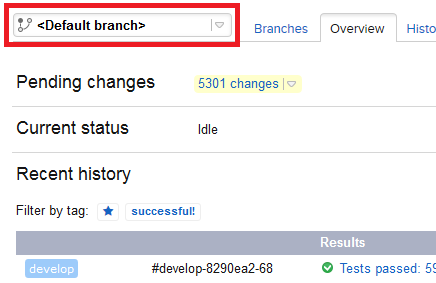
What's wrong with our VCS root/trigger? Is the history just broken, and out of luck? How to configure this to have these different builds consolidated again into the same "develop"?
Please sign in to leave a comment.
After some confusion about branching versus <default> branch, we had overridden the teamcity.build.branch parameter, leading to this behavior. Shame on us!