Subversion and Visual Studio plugin (TeamCity 5.0 (Darjeeling) EAP: build 10307)

The TeamCity plugin of (TeamCity 5.0 (Darjeeling) EAP: build 10307) is not working correctly with SVN and paths with spaces in it (ie: C:\Users\User\Documents\Visual Studio 2008\Projects\Etc).
The path parameters in the call to svn.exe need to be enclosed in double quotes:
Now this is executed:
"E:\Program Files\SlikSvn\bin\svn.exe" export -r BASE C:\Users\Remco\Documents\Visual Studio 2008\Projects\PLTC\intranet\src\Modules\Reports\Pltc.DotNetNuke.Reports.Melon\Reports.dnn C:\Users\Remco\AppData\Local\Temp\1\tmpC511.tmp
output:
svn: Try 'svn help' for more info
svn: Error parsing arguments
but it should be:
"E:\Program Files\SlikSvn\bin\svn.exe" export -r BASE "C:\Users\Remco\Documents\Visual Studio 2008\Projects\PLTC\intranet\src\Modules\Reports\Pltc.DotNetNuke.Reports.Melon\Reports.dnn" "C:\Users\Remco\AppData\Local\Temp\1\tmpC511.tmp"
output:
Export complete.
Is this a bug or a misconfiguration of mine?
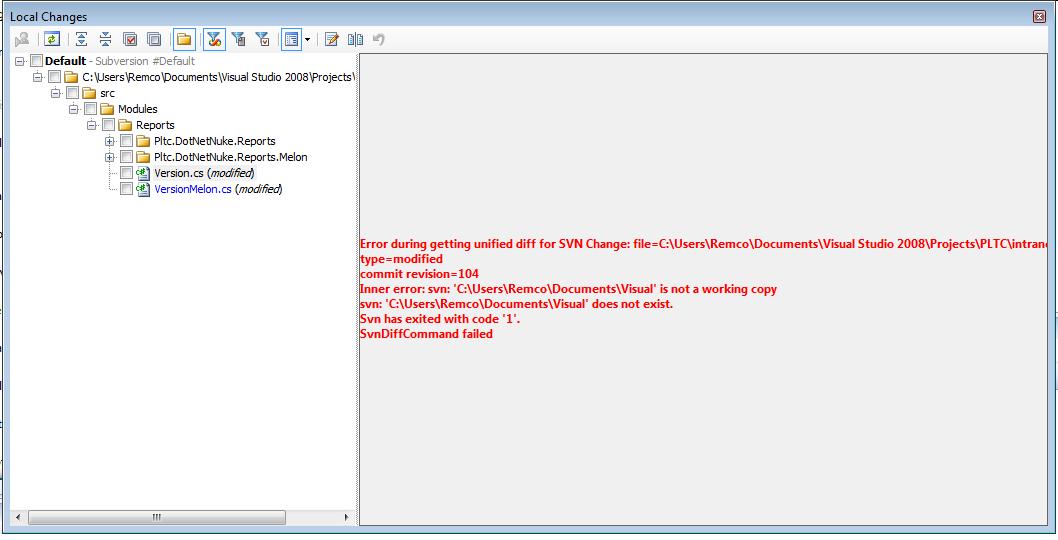
Also in the 'Local Changes' dialog I get an error (see attachement). This has also to do with the path quoting.
Remco
Attachment(s):
teamcitysvn.jpg
Please sign in to leave a comment.
Unfortunatly, this is a known issue. Please have a look to http://www.jetbrains.net/tracker/issue/TW-7527
The workaround is to move checkout directory to the folder without spaces.
I updated the priority of the issue.
Thanks for the quick answer. I already moved the project to a folder without spaces. That works.
But I can imagine that on a VS/.net environment it is not very uncommon that people put their projects in the default 'Visual Studio 2008/Projects' folder. That will break in this case.
Thanks for updating the issue, I'll see it in some next release.