VCS triggers are not excluding anything

Issue:
After updating our Teamcity server instance from 9.1.1 to 9.1.3, we have noticed that our git vcs triggers seem to be getting ignored and builds that should not trigger are triggering, slamming all of our agents and causing long wait times for critical builds. Note: this may have been occuring since 9.0.2. but i am unable to verify. Is this something that we possibly have setup wrong, or could it be a bug with the software
Details:
Our setup:
- 4 build servers with 8 quad cpu's and 128 gigs of ram each and lots of hard drive space
- TeamCity Enterprise 9.1.3 (build 37176)
- 18 agents running as windows services spread across the servers
- VCS are all git (using internal gitlab server we host)
- Each build server has MySysGit 1.9.5 installed and we are using teamcity's built in git vcs system (jgit)
Here is a simpliefied version a build configuration setup. We have a large git repo named cw. Inside that repo there are many folders of different projects. In the client build configuration, it builds a folder called clientstaging. We have all of these build configurations based off templates so that they can be reused.
The git vcs trigger in this example is +:ClientStaging/** 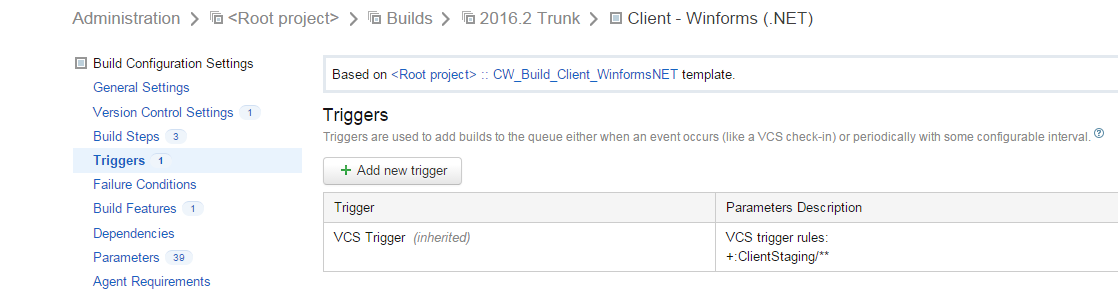
However, if you look at recent builds for this build configuration, you can see that it is triggering when no files in that directory are commited, therefore not matching the trigger.
Ex. 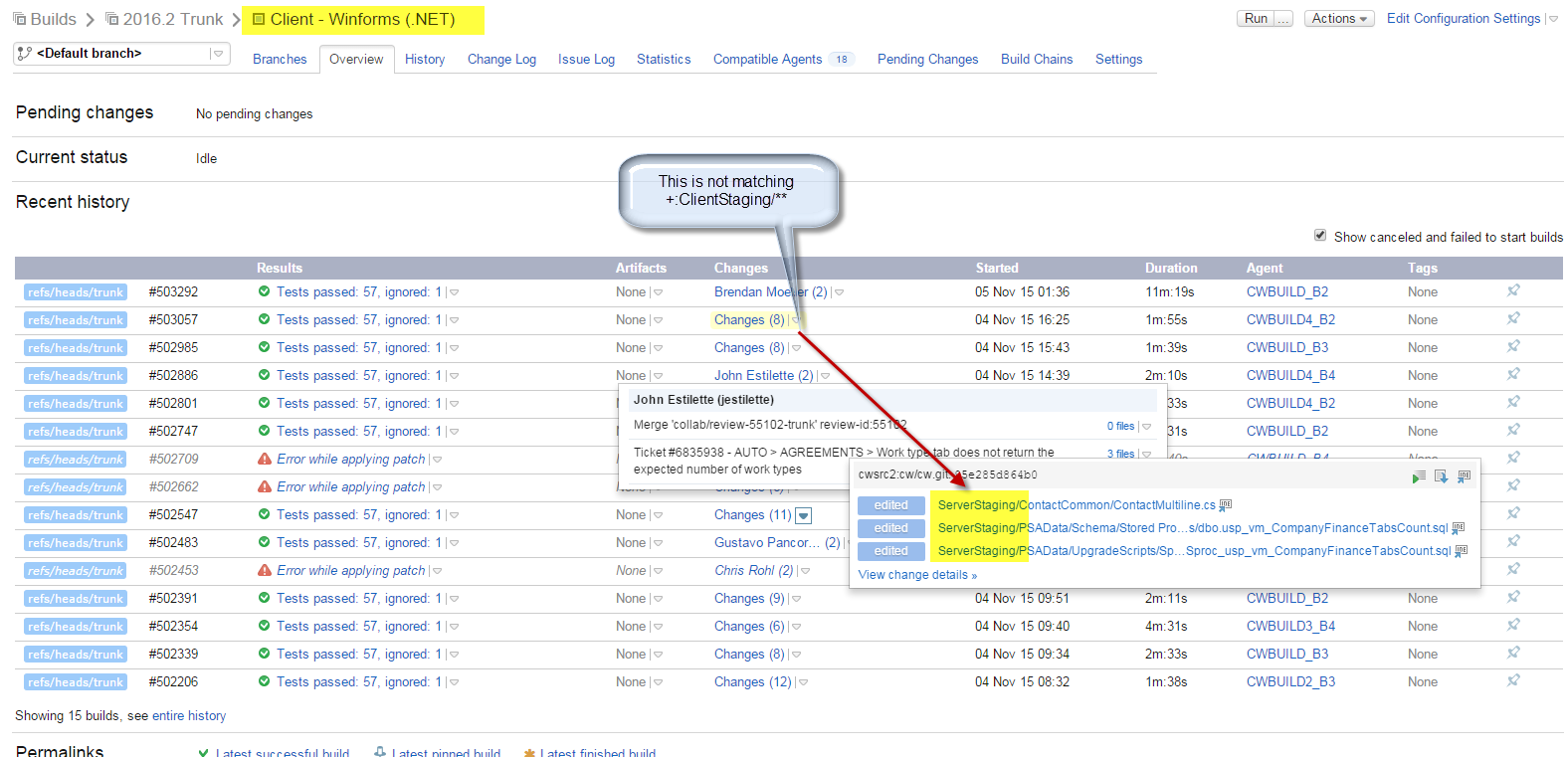
And the proof git is triggering that build: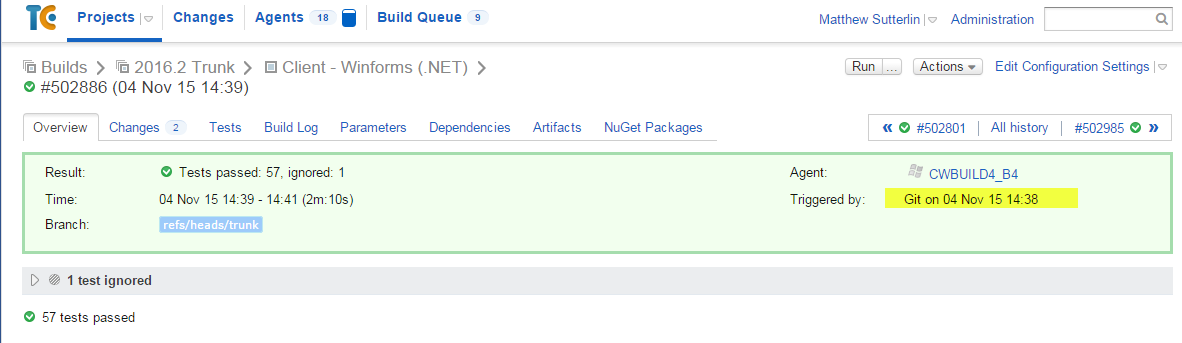
To be thorough, here are the vcs settins from the template: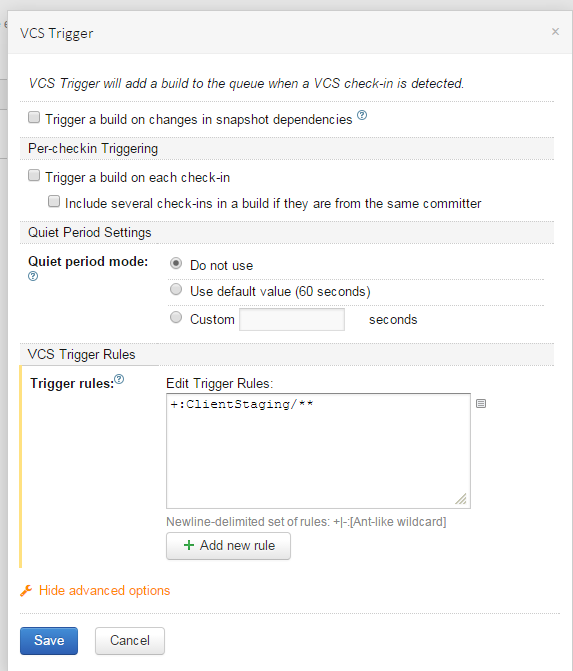
I cannot tell if this is a seutp issue or an actual bug with the system, as it worked fine for the last 6 months until one of the lataest version updates. I searched the forum as well as youtrack and wasnt able to find anything on this. Thanks in advance for the help!
Message was edited by: Matthew Sutterlin
Please sign in to leave a comment.
Hi Matthew,
unfortunately it is a known problem with trigger rules and merge commits: https://youtrack.jetbrains.com/issue/TW-24747, this comment https://youtrack.jetbrains.com/issue/TW-24747#comment=27-814689 contains details why it happens.
One thing that may help is to add an internal property
teamcity.vcsTrigger.analyzeFullHistoryForMergeCommits=false
With such a property trigger will run build only when a commit from pending changes was matched by trigger rules.
Another workaround is to configure checkout rules tracking only the desired directory in repository, in your case rules will be something like this:
+:ClientStaging
In 9.1.3 there was a similiar problem with checkout rules though: merge commit without files were often shown in build configuration: https://youtrack.jetbrains.com/issue/TW-35934. This issue is fixed in upcoming 9.1.4. If you decide to use checkout rules you can download 9.1.4-RC with the fix for TW-35934 from ftp://ftp.intellij.net/pub/.teamcity/nightly/9.1.x/. This build contains only bugfixes and doesn't change data format so you can always switch back to 9.1.3 in case of any problem, it is always better to make a backup before upgrade.
I know this is an old bug, but I just encountered the same issue. Merge commits are triggering the builds even if file being tracked isn't part of the commits. E.j.
This shouldn't be the case, the build shouldn't be triggered unless developer 2 also increases the version.
This is my trigger setup
And here is the changes on the latest commit that shouldn't have triggered the build (the same "Encryption.cs" is what merged in both commits):
I'm not sure how to configure the internal property described above: teamcity.vcsTrigger.analyzeFullHistoryForMergeCommits=false
I'm using TeamCity Professional 2017.1.2 (build 46812)
You can configure them as described in documentation: https://confluence.jetbrains.com/display/TCD10/Configuring+TeamCity+Server+Startup+Properties#ConfiguringTeamCityServerStartupProperties-TeamCityinternalproperties
Thank you so much @Dmitry Neverov, this really solved the problem! My only question now is, is this accepted as the proper solution? Or should I consider this a workaround and that a fix for the open tickets mentioned above will be issued at some point?
This is the only workaround at the moment, you can watch the issues mentioned above to get a notification when they are fixed and a better solution is provided.
Thank you!