No compatible agents for NVM installer after update on premise

Hi all, we're running on premise Teamcity and we're building NPM packages there.
Two build agents are running on the same server, connected, authorized etc - working for years.
We did not change anything except installing the very latest security update on Friday - and now all of builds that are using ‘Node.js NVM installer’ are stuck, because there is ‘no compatible agents’.
I've tried to update a mentioned plugin, it was couple of versions behind current + restarted everything - nothing changes.
What can I do to fix this issue? (and what info can I provide here to get this fixed?)
Please sign in to leave a comment.
Forgot the screenshot, just in case, not very helpful anyways.
Hi,
It seems that the agents are missing some requirement for the Node.js NVM Installer build step. Could you please share a screenshot of the build step settings? Also, are there any Agent Requirements listed in the build configuration settings?
What version of TeamCity are you running and what was the security update you have installed?
What version of the Node.js plugin are you using? Could you please share a screenshot of the plugin seen in Administration | Plugins?
Hi Eric, yes, I totally agree that it looks like some requirement is not met, but I'm struggling to locate it :)
Version: TeamCity 2024.03 (build 156166), effective release date 2024-03-26, currently running in the professional mode.
So the latest release we've installed is also listed above.
Plugin name is: Node.js build runner, I believe it's the only one that you can google for installing nodejs in build steps.
Version 2.0.26 is the latest provided by author (Nov 2023 I believe)
All screenshots attached.


We've faced the same issues and I've found a bug in youtrack where they advise to install latest version of the plugin (can't find a link right now), so you should probably install a newer version from the plugin teamcity:
https://teamcity.jetbrains.com/buildConfiguration/bt434/4548373?buildTab=artifacts
specifically https://teamcity.jetbrains.com/repository/download/bt434/4548373:id/teamcity-node-2.0.27.zip - the build shows as red, but they've said that it is red for older versions of the teamcity.
However seems like you may face another issue (I'm facing that also): https://github.com/jonnyzzz/TeamCity.Node/issues/190
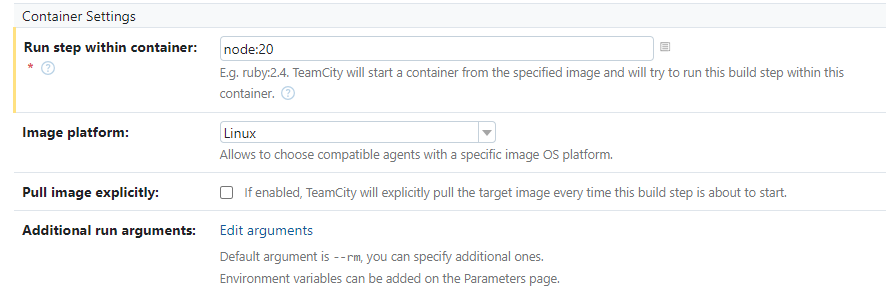
Hi guys, actually it turned out that we needed to get rid of this step long ago and switch to ‘teamcity way’ of using node:20 docker for this.
I'm closing this thread as we've not ‘fixed’ it but get rid of it.
Let me know if you need further details on our solution though.
yeah. please, let us know.
So, before last week the logic of the build was like: install needed nodejs version into working directory of agent + run two shell steps in the same environment. Three steps in total.
Now we have removed the first step - the one that uses ‘Node.js NVM installer’ plugin - and replaced those two steps with shell actions with new two steps in Docker in Teamcity runner named literally ‘Node.js’
See below screenshots, settings are very simple

=>
For us the update of the this plugin to 2.0.27 fixed the issue, but all our tests run on Windows-VM's.
Thank you Inekrashevych