Schedule trigger

Hello
I have setup a Scheduled trigger that should start the build if there are pending changes in our development branch. But the build does not start even if they are pending changes.
The Trigger setup is as following:
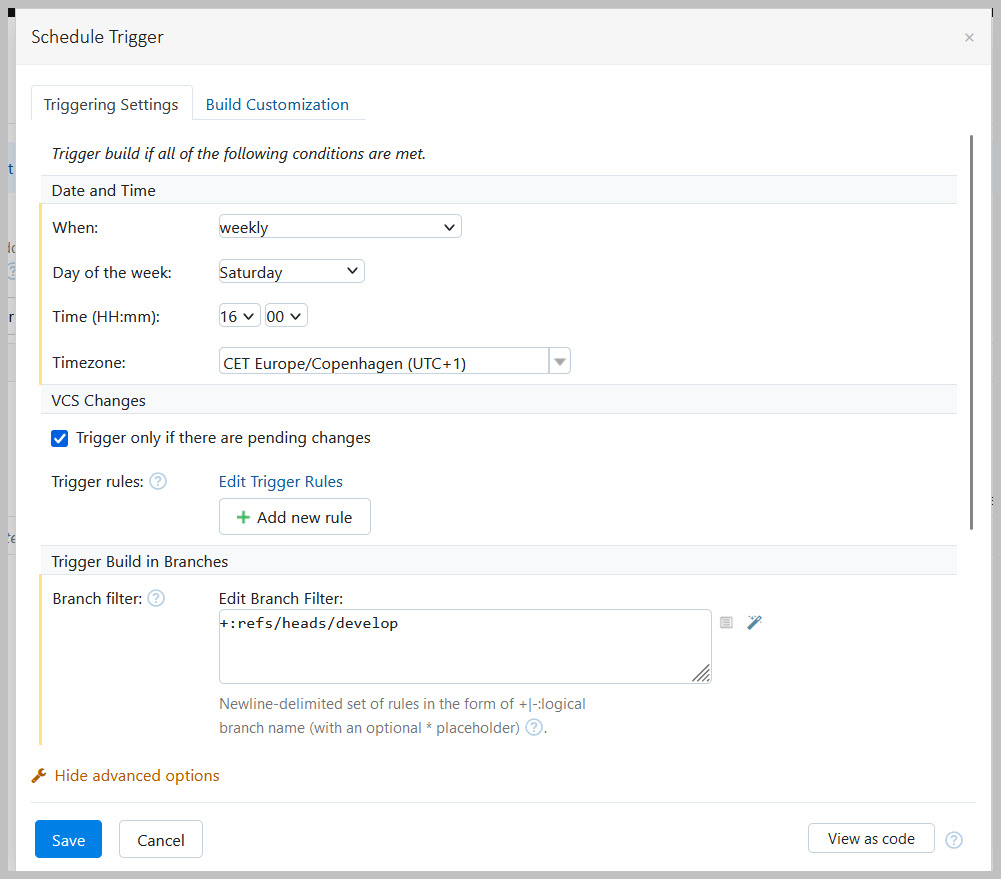
What I am missing?
Please sign in to leave a comment.
I assume that the following may be the cause of the build not triggering with your configuration.
The "Trigger only if there are pending changes" option considers only newly detected pending changes: if there were pending changes before the trigger was created, the build is not triggered.
Please see https://www.jetbrains.com/help/teamcity/2023.11/configuring-schedule-triggers.html for the details on each option.
Please let me know if that's the case or if you have any additional questions.
Best regards,
Anton
Hello Anton
I also had in mind whether pending changes were the reason, I will follow up that next time changed merged the develop branch.
Otherwise you did notes anything that is not correct in the Schedule Trigger I have setup.
No, I don't see anything in the configuration that could be the cause of the issue.
Please check when there are new changes, and let me know.
Best regards,
Anton
Hello
My build are showing 7 pending changes.
The trigger is set to the following:
And the trigger was configured before changes was merged to developer branch.
Could you confirm your VCS root settings? If you use `*` (for example, `refs/heads/*`) in branch specifications, the part matched by `*` (for example, `master`) is a logical branch name (https://www.jetbrains.com/help/teamcity/working-with-feature-branches.html#Logical+Branch+Name). In such a case, TeamCity will consider just `develop`, not `refs/heads/develop` as a branch name, and you should use `+:develop` instead of `+:refs/heads/develop` as a branch filter in the trigger. Please let me know if it helps in your case.
Best regards,
Anton