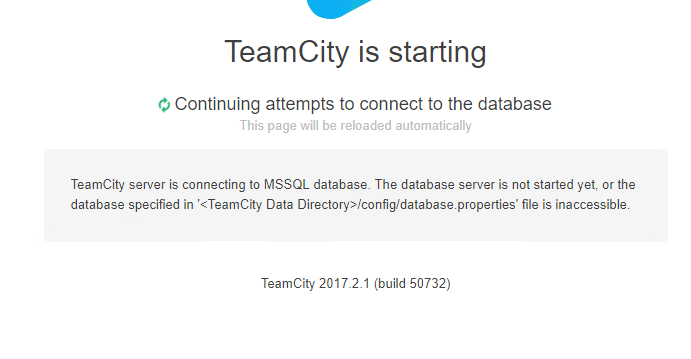
Continuing attempts to connect to the database

I using 2017.2.1 and migrate the Internal database to MSSQL database.
and get the error as below the picture file? I already check the MSSQL service is already turn on and the database.properties is point to correct.
MSSQL is already success migrate from internal database using the command line to migrate.
Please sign in to leave a comment.
Hi Kelvin,
thanks for your report, could you please check the teamcity-server.log file in the logs folder for any error being logged regarding this issue?
from the logs is show could not connenct to MS SQL. as below is the logs detail.
Version file lock was successfully obtained: C:\TeamCity\webapps\ROOT\BUILD_50732
Current stage: Looking for the TeamCity Data Directory
The TeamCity Data Directory path is determined using the startup configuration from 'C:\TeamCity\conf\teamcity-startup.properties' file
The TeamCity Data Directory "C:\ProgramData\JetBrains\TeamCity" exists
The main configuration file "C:\ProgramData\JetBrains\TeamCity\config\main-config.xml" exists
The database properties file "C:\ProgramData\JetBrains\TeamCity\config\database.properties" exists
The internal database data file "C:\ProgramData\JetBrains\TeamCity\system\buildserver.data" doesn't exist
Data Directory version: 829
Current stage: Looking for the database configuration
Database properties file "C:\ProgramData\JetBrains\TeamCity\config\database.properties" exists
Internal HSQL database file (C:\ProgramData\JetBrains\TeamCity\system\buildserver.data) doesn't exist
Database connection URL: jdbc:sqlserver://192.168.10.101:1433;databaseName=Teamcity;integratedSecurity=true
Using database connection URL from the database properties file. The URL is: jdbc:sqlserver://192.168.10.101:1433;databaseName=Teamcity;integratedSecurity=true
Using external (MSSQL) database
Current stage: Connecting to the database
JDBC loader: loading JDBC drivers (for the first time)
Could not connect to Microsoft SQL server.
Cannot open database "Teamcity" requested by the login. The login failed. ClientConnectionId:633f2202-378c-4838-a0ad-fcdf9f03f24d (after 10 attempt(s); total time spent waiting 1002.610 ms; driver version 6.2.2; java.version=1.8.0_151; jdk.tls.client.protocols=[]; jdk.certpath.disabledAlgorithms=[MD2, MD5, SHA1 jdkCA & usage TLSServer, RSA keySize < 1024, DSA keySize < 1024, EC keySize < 224]; jdk.tls.disabledAlgorithms=[SSLv3, RC4, MD5withRSA, DH keySize < 768, EC keySize < 224])
SQL exception: Cannot open database "Teamcity" requested by the login. The login failed. ClientConnectionId:633f2202-378c-4838-a0ad-fcdf9f03f24d (after 10 attempt(s); total time spent waiting 1002.610 ms; driver version 6.2.2; java.version=1.8.0_151; jdk.tls.client.protocols=[]; jdk.certpath.disabledAlgorithms=[MD2, MD5, SHA1 jdkCA & usage TLSServer, RSA keySize < 1024, DSA keySize < 1024, EC keySize < 224]; jdk.tls.disabledAlgorithms=[SSLv3, RC4, MD5withRSA, DH keySize < 768, EC keySize < 224])
Could not reach the database, it may be the database server is not started yet or connection properties are not valid.
Thanks Kelvin,
Microsoft SQL sometimes has special configurations that it needs to work properly, please make sure you followed the steps here properly: https://confluence.jetbrains.com/display/TCD10/Setting+up+TeamCity+with+MS+SQL+Server
Also make sure that if you are using proxies to access the SQL server you have configured teamcity to use the proxy properly.