Snapshots not shared within build chain

Hello all,
I'm quite new to TeamCity. I already had a running setup with a single build configuration (15 build steps for multiple purposes) which I now want to "split up" into more dedicated configurations (1: to retrieve and "clean" the source, 2: build UI, 3: build server, 4: pack all into nuget, 5: deploy to octopus).

My current problem is, that my first step (100) retrieves the source from VCS and performs its task as expected but in the later configuration steps, the source is no longer available to the build agent even if I set "snapshot dependencies" for all later build steps. Also, the working directories of the other configurations are empty.
This is my build trigger for 110:

This is the dependency for 110:

This is my trigger for 120:
 This is the dependency for 120:
 This is the dependency for the composite configuration 130:

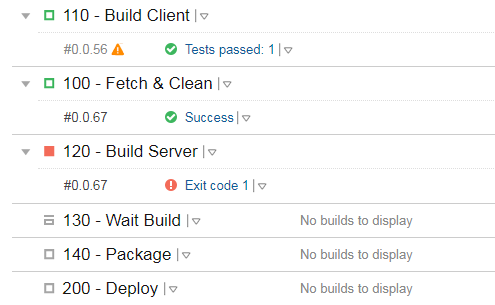
As you can see from the overview only 100 works successful and 110 and 120 always fail (120 don't even start to work and I don't know why).
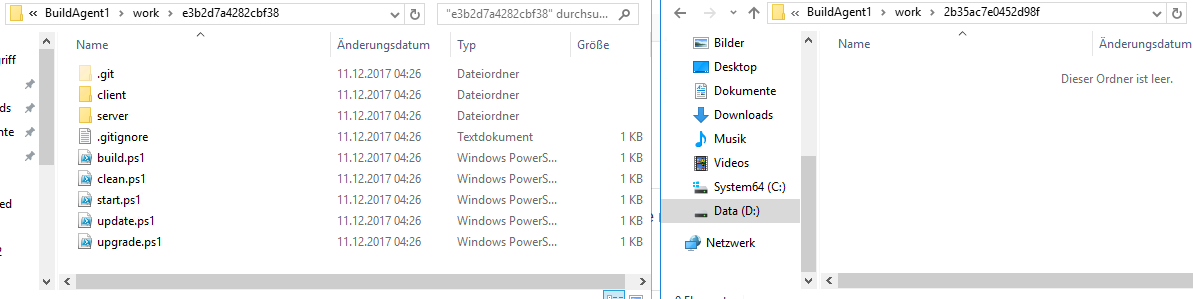
This is the working directories for the configuration steps. As you can see only the one for the first configuration (100) contains data. The other ones (I only show one as the example) are all empty.
What am I missing or doing wrong?
Any tips would be great :-)
Kind regards,
Heurazio
Please sign in to leave a comment.
Hi Heurazio,
thanks for your request. First things first, once you set up a snapshot dependency, you can move the build triggers (VCS Trigger is probably starting 100) to the end of the chain (200 in your case). Because teamcity understands a snapshot dependency as a forced requirement, it will automatically pull to the queue an instance of each of the required dependencies and execute them in the correct order. If you run 100 manually, then you can start running 200 instead and it will just do the same thing. This will slightly reduce the complexity of your build chain for easier management.
This said, the "work" directory for each build configuration is determined with base on its VCS configuration, which means that the "work directory" isn't shared between configurations with different VCS roots. The "run in the same agent" option is usually recommended when using fixed paths for the work directory, or when using fixed paths to access the resources that the subsequent configurations require.
If you require the same contents, you can simply configure the build configuration to use the same VCS Root and configure it the same, so they will share the folder. If the requirement is only files that were created during the build (or a mixture), you can publish them on "100" as artifacts (General tab of the configuration, set them up in the "Artifact paths", then set an artifact dependency. This will automatically pull all the artifacts defined in the dependency from the build configuration, and if this set of files is the only requirement, then you can drop the "run on same agent" option and run them on multiple ones (which enables parallelization)
I hope this provides some insight. If you have more questions, please don't hesitate to ask.
Hi Denis,
thanks for your fast answer. Will the snapshot be published to the other steps or do I need some extra steps? As I understand you correctly the VCS root will still stay in 100? Only the trigger has to move to 200.
My VCS root contains two independent folders 1: client, 2: server. Both can be built independent but share the same VCS root because I like a "full rebuild" if anything changes. Would this also be possible with two different VCS roots (1 for client and 1 for a server) so that if i change any of the two roots and both parts will be rebuilt? Then i could really compile both in parallel instead of "after each other" (the current build chain is forced to use the same agent at the moment).
At the moment the steps performed as followed:
100: check out git and clean some files (no need for a build, only for local testing)
110: build the client contained in the "client" folder (angular cli app)
120: build the server contained in the "server folder (asp.net core2 app)
130: wait for 110 and 120 to finish (here I like to "aggregate" the snapshots for later packaging
140: run NuGet for server and client and store them as artifacts (before this step, there are no artifacts)
200: deploy the created packages to octopus and promote after a successfull test deploy
Another question on snapshot dependecies. As you mentioned, the work directory is determined by the VCS configuration. Would it be a problem if i define "equal" VCS configurations in 110, 120, 130 ... so that i get the same "working directory" or would this be a problem? I really only like the content to be checked out once and then be shared over the snapshot dependency. Is this possible? Currenty all later projects don't have any VCS setting because i thaought that it would checkout the content again.
Thanks for your help :-)
Hi Heurazio,
thanks for the description. I'm a bit confused with the steps order, is the git checkout/clean up really required?
Just by adding the VCS Root into the build configuration, it should automatically be pulled into the checkout directory, so a step for git checkout should not be necessary unless you have some custom requirements.
VCS Roots attached to build configurations also support checkout rules (https://confluence.jetbrains.com/display/TCD10/VCS+Checkout+Rules). This means that you could simply remove step 100, add the VCS Root to both 110 and 120, have 110 use a checkout rule "+:client => .", 120 "+:server => .", and you would have client and server in separate work directories and only downloaded for the client/server steps, without having to download everything for every step. If you need to perform some clean up on the files of the repository, you might want to do it directly on 110/120 as well, or exclude specific folders from the checkout rules (please note that as of now, only folders are supported, excluding individual files is not possible).
Having 2 separate VCS Roots would be basically the same thing, but is not required, and having only one has some advantages (such as reduced amount of configuration and number of requests to the server).
Regarding 130, any folder or files (this includes those that were originally in the VCS Root) can be exposed as artifacts. For example, you could publish the full "client" folder as an artifact, teamcity handles it just fine. You could on 130 pick up all the required files from 110 and 120 simply as artifact dependencies (this does allow for individual files).
If your build doesn't need to scale or be distributed, you can instead, as mentioned, create a specific folder for checkout, then reuse that as the "checkout directory" for 110, 120 and 130, so all 3 builds reuse the same folder. You could have it outside of a build agent's folder (although the user would need permissions to access it and write on it), and install 2 build agents on the same server, so both agents can run 110 and 120 in parallel, but you would need to ensure that 110 and 120 do not access files that the other one accesses. Having them on separate checkout directories (such as the default one) would allow you to simply run them in different agents, even if they are in separate devices, and the artifact publishing system would allow a simple way of picking up the results of the builds, whether they are packaged contents or still simple files and folders.
140 and 200 seem to be fine.
Hope this helps.
Hi Denis,
thanks for your answer that helped a lot. I thought I need a "single point" for checkout from GIT. My last problem is where do you get a general build number now. When 100 is removed (%build.number% of 100 was the major version used by the other projects).
Also i get a "Unsupported rules for agent-side checkout: +:client => ." warning.
Hi,
You could keep 100 just to create the build number, this is a rather common scenario. It wouldn't need to have any VCS config at all.
Regarding the VCS Trigger I mentioned in the first post but didn't expand on that. On your scenario, you could place it in 200 (even if the VCS Roots are only configured in 110 and 120), which would automatically pull all other dependencies and the builds will wait for completion of all their dependencies as you would expect.
Thanks a lot for your help. All working fine now.