Error while resolving artifact dependencies

Hi,
i try to setup a new build configuration which should start, when the debug build completes. In the debig config i setup dto publish artifacts.
In the testing config i set up artifact dependencies like this:
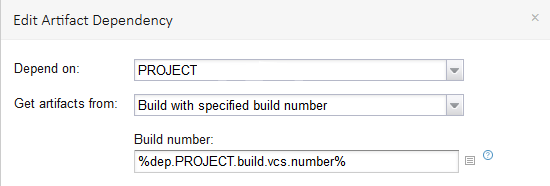
When the debug build is complete, the testing config is triggered correctly. But i get a error message:
[Resolving artifact dependencies] Failed to resolve artifact dependency <PROJECT, build #%dep.PROJECT.build.vcs.number%>:
Failure while downloading artifact list from server: Failed to download
[http://localhost:8080/httpAuth/repository/download/PROJECT/%25dep.PROJECT.build.vcs.number%25/teamcity-ivy.xml]:
Illegal status [404] while downloading http://localhost:8080/httpAuth/repository/download/PROJECT/%25dep.PROJECT.build.vcs.number%25/teamcity-ivy.xml:
Not Found (jetbrains.buildServer.artifacts.ResolvingFailedException)
TC is not able to build the correct link. When you look at the link in the error message, TC ist not parsing the %dep.PROJECT.build.vcs.number% parameter.
It is trieing to open http://localhost:8080/httpAuth/repository/download/PROJECT/%25dep.PROJECT.build.vcs.number%25/teamcity-ivy.xml but it should be [http://localhost:8080/httpAuth/repository/download/PROJECT/15/teamcity-ivy.xml.
When i put the correct link in the Browser, i can see the artifacts. The problem is only that TC cant parse the parameter.
What did i wrong?
Please sign in to leave a comment.
I solved the problem for me.
I changed the artifact dependency to "build from the same chain" and added snapshot dependency.