Connecting TeamCity to BitBucket Cloud

I set up a TeamCity server using the latest version. Our Dev team uses BitBucket Cloud for our git repos. All I want to do is use OAuth to connect TeamCity to BitBucket cloud so I can connect TeamCity projects to BitBucket cloud WITHOUT having to sign in as a specific user.
I have followed all documentation I could find, including: https://confluence.jetbrains.com/display/TCD10/Integrating+TeamCity+with+VCS+Hosting+Services#IntegratingTeamCitywithVCSHostingServices-ConnectingtoBitbucket), and I'm baffled this doesn't just work seemlessly. I figurd people out there were doing what I was doing: BitBucket Cloud and TeamCity.
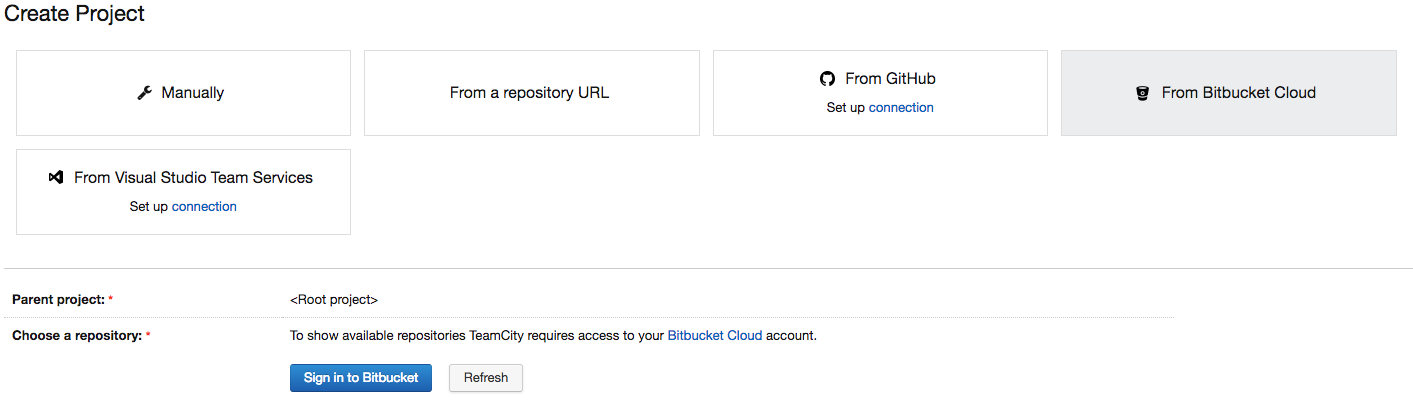
I have a "Connection" to BitBucket Cloud set up in TeamCity, exactly as the documentation says, with the correct permissions. But when I click on "Create Project" and choose "BitBucket Cloud" it asks me to sign in. Why do I need to sign in when I have an OAuth connection set up with the correct permissions?
Any direction or help would be greatly appreciated.
Thank you,
Gary
Please sign in to leave a comment.
Hi Gary,
You already set up the connection to bitbucket and it still asks you to sign in to it? What happens when you click the button? Does it still ask you for your login credentials or does it connect automatically to it?
Correct. Yes, it asks me for my credentials.
Hi Gary,
this is by design. Your login to bitbucket is required in order to authenticate the TeamCity application so that it can read your repositories. Unfortunately Bitbucket doesn't provide non-expiring access tokens, so connection only allows to list the repositories and doesn't simplify authentication, see https://youtrack.jetbrains.com/issue/TW-47495#comment=27-1674554 for details.
Thanks Dmitry.
Maybe you can use ssh keys for that. In Bitbucket it is possible to add an SSH key to the team. As far as I understand this key gives access to all repositories owned by the team. You can upload the private part of the key into TeamCity (https://confluence.jetbrains.com/display/TCD10/SSH+Keys+Management) and use it for authentication in all git VCS roots.
What is the purpose of this OAuth feature then? It seems like it doesn't actually connect to the repository to allow code to be pulled. Am I missing something?