Report error whenever the test fails before execution

Hi,
We have a similar scenario as described at this post https://teamcity-support.jetbrains.com/hc/en-us/community/posts/206582629-XML-Report-Processing-not-showing-results where the test fails to start and the error result does not get reported on the test tab neither on the TeamCity build overview page. The build log indeed shows the test failure snippet (in our case a class was not found).
We run a build with multiple test suites and there's a lot of information on the build log so it's hard for the user to trace this issue down given there's no clear error indication on the build overview page neither the test tab (this one makes sense to me since no test was executed).https://teamcity-support.jetbrains.com/hc/en-us/community/posts/206582629-XML-Report-Processing-not-showing-results
We're looking for suggestions in terms to improve the feedback and make it easier for the users to see this issue instead of having to inspect the build logs.
Here's how the test xml looks like:
<testsuite changelist="none" disabled="0" errors="1" failures="0" name="FooTest" starttime="6/26/17 10:29 AM" testmachine="" tests="0" time="0.0">
 <properties>
 ...
 </properties>
 <error message="FooTestSuite" type="java.lang.ClassNotFoundException">
 java.lang.ClassNotFoundException: FooTestSuite
 at java.net.URLClassLoader.findClass(URLClassLoader.java:381)
 at java.lang.ClassLoader.loadClass(ClassLoader.java:424)
 at sun.misc.Launcher$AppClassLoader.loadClass(Launcher.java:331)
 at java.lang.ClassLoader.loadClass(ClassLoader.java:357)
 at java.lang.Class.forName0(Native Method)
 at java.lang.Class.forName(Class.java:264)
 </error>
</testsuite>
Thanks.
Please sign in to leave a comment.
Hi Henrique,
thanks for your feedback. I'll take a deeper look into the other issue later, but for starters, it's hard to improve much on the feedback that you want to look at. When reporting test failures, it doesn't necessarily have to be one single cause of failure. 30 different tests could fail or there might be many other reasons. Several reasons are reported properly, but some of them are hard to trace, if you have particular issues you might always provide us feedback with that.
The build problems section should give you some insight on all the problems that were detected throughout the build process.
On the other hand, there is an option for you to set the result message for an easier overview. You can use this service message for it: https://confluence.jetbrains.com/display/TCD10/Build+Script+Interaction+with+TeamCity#BuildScriptInteractionwithTeamCity-ReportingBuildStatus
You can also look the service message above that description in the docs for more information on reporting build problems, in case you are interested on expanding them. You can also create a plugin to report your own kind of problems.
Hope this helps.
Thanks for your reply! We are currently using the TeamCity message system to report all sort of issues that happens during the build process, such as shown below:
Hi Henrique,
I'm not really sure what you mean. The "Overview" page for build results shows the build problems with a description. For failed tests, which for JUnit reports should be picked automatically, it includes the test name and stacktrace, the tests page includes details on all tests, passed and failed. Unless you are using a really old release, what I think you are asking seems to be already in, so if I'm misunderstanding something, please expand on what you would like to see related to the error you mention and what you are currently seeing in the build results page, overview and tests tabs.
Hi Denis,
The issue is that the test fails to start and the error result does not get reported on the test tab neither on the TeamCity build overview page. The build is shown as passed which is a misleading result.
Hi Henrique,
But what do you exactly mean with "test fails to start"? If the test suite is not executed at all, then it won't appear on the test tab as there isn't tests to be reported. How they fail to start might be reported by the build overview, but it will depend on the reason why. If all the build problems are exclusively reported by you, then you will probably need to take a look into the "failure conditions" of the build configuration. Also, if at any point you are using a service message to make the build succeed, it will succeed independently of the problems it has.
If none of this helps, please send us a full build log that should have failed but didn't through the submit a request button on top.
Hi Denis,
By " test fails to start" I meant the test never executed and that happened because of a misconfiguration on JUnit by the engineer that didn't refer to the correct test class on the JUnit configuration. This was not caused by TeamCity. The error message is :
The build logs shows the error message:
Now, my request is that build overview should show this error and this is not happening. Here are my failure conditions configuration: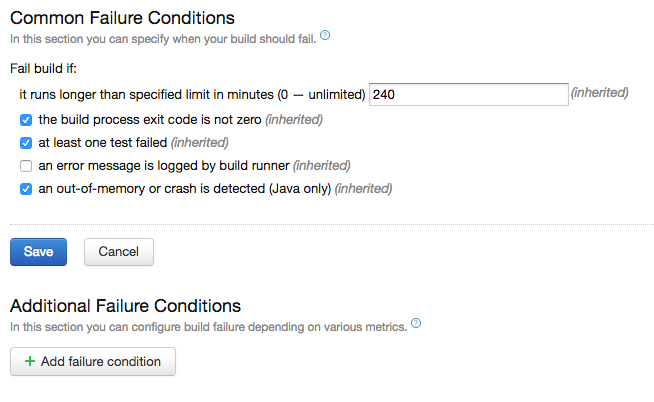
Hi Henrique,
which build runner are you using? And which version of teamcity? Knowing this two details is relevant for what causes the issue, that's why I asked for the build log in the first place, as it should contain both pieces of information.
The issue here is that different runners report errors in different ways, so I would need to know which runner you are using before being able to mention why it doesn't report the error.