Azure Resource Manager Plugin. Can't create cloud profile

Hi,
I'm trying to setup the Azure plugin to start/stop build machines.
I have installed Azure Support: Resource Manager integration plugin 0.5.3 on TeamCity 2017.1.1 (build 46654)
I have an AD account setup in Azure. I've created the app registration and given it a role in Azure.
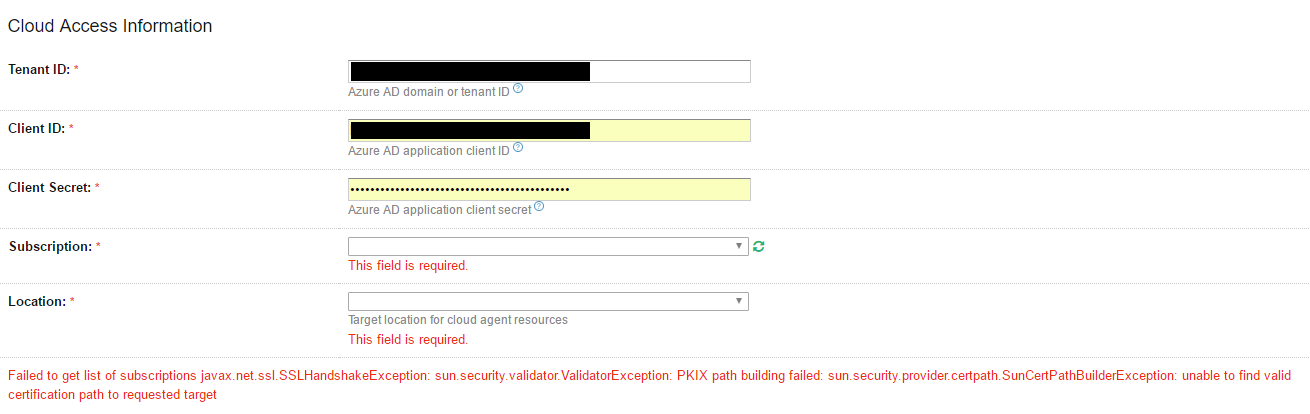
In TeamCity I'm trying to create a cloud profile. I can select "Azure Resource Manager" from the dropdown.
I enter the "Tenant ID" which I've collected from the Directory ID of my Azure Active Directory blade.
I enter the "Client ID" which I've collected from the Application ID of my app registration from AD
I enter the "Client Secret" which I've collected by creating a new key for the app registration and collecting the 'Value' created by Azure.
No matter what I enter the "Subscription" and "Location" fields will not populate and I get the error:
Failed to get list of subscriptions javax.net.ssl.SSLHandshakeException: sun.security.validator.ValidatorException: PKIX path building failed: sun.security.provider.certpath.SunCertPathBuilderException: unable to find valid certification path to requested target
I get this error even if I enter rubbish into the fields, so I'm guessing it simply isn't accepting the values. However, I've verified the above credentials work from powershell.
Any help or pointers would be really appreciated!
Please sign in to leave a comment.
Hi Dan,
Can you connect to Azure services from the TeamCity workstation? Which Java version is used by TeamCity?
Please check the following links:
https://github.com/Azure/azure-documentdb-java/issues/44
http://code.naishe.in/2011/07/looks-like-article-no-more-unable-to.html
https://stackoverflow.com/questions/42162987/java-connecting-to-azure-event-hub-suncertpathbuilderexception
Hi Julia,
Thanks for your reply.
This is just using the java included with TeamCity in the jre folder which claims to be 1.8.0.121
I'm able to use powershell from my TeamCity server and connect to my AD, so commands like
Login-AzureRmAccount -ServicePrincipal -Tenant ....
all report success from the machine itself.
TC is running over https but I've installed the certificate into the keystore on the TC server which is referenced by my server.xml file.
I haven't opened any ports beyond http/https but wireshark doesn't report any strange traffic from the TC server when I try to refresh the subscription list in the cloud access information form.
Hi Julia,
Can you help to find out what kind of certificate it looks for?Is it looking for the certificates from Microsoft azure to verify the connection or what.