running a python test suite

What is the correct way to configure a build step that runs nose tests IN a suite?
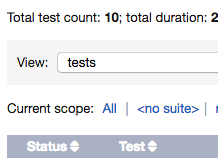
Whenever I run my tests I always see the message <no suite>
In my project I have the tests organized by package, with every package corresponding to a test suite. I use nosetests.
Please sign in to leave a comment.
Hello Diego,
Nose is not supported by TeamCity out of the box; however, there's an external plugin that can help.
Hi Julia
I don't think I am using the plugin, yet I can run nose tests like this (see attached pic):
And when it runs it looks like this:
But I don't know what to do so it does not show <no suite>. It would be great if you could get the suite for the package where the sets of tests are run.
Thanks.
Diego,
The Python runner that you are using is not provided out of the box, it is an external plugin: all the plugins on your server are listed on the Administration | Plugins List page. Knowing which plugin you are using might help.
Hi Julia,
It is the python plugin I think...
Hi Diego, thanks for providing the plugin version information. Can you elaborate why displaying <no suite> is problematic?
I consulted the plugin developers and it seems to be just an implementation thing. You should still be able to filter the test list by selecting to view suites/packages.
Diego, regarding the question in your email: the plugin recognizes the packages and reports them. However, either the plugin does not recognize suites or no suites are defined, and that's why the default one named <no suite> is used.
I am sorry I cannot more helpful at this point. Since this is an external plugin, I suggest you file an issue to the plugin author.