TeamCity does not detect latest changes in Git

In a TeamCity build, I can see the following Change Log for the default branch (in our case, set to alpha). Notice the latest commit is 552db:

When I look into the repository's log, I see the following:
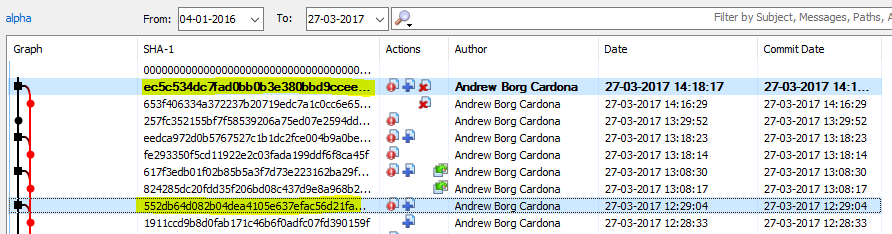
There are several commits that after the 552db that are not detected by TeamCity. So far the solution seemed to be to delete the VCS root and re-create it, but that is obviously not desired.
Any clue as to why this happens? Any help would be very much appreciated.
Some info on our environment that might help:
TeamCity version: 9.1.7
VCS: Git (Github Enterprise)
Checkout mode: Server-side checkout
Checkout directory: Custom (we append the branch name to the checkoutDir)
Checkout rules: We have some directories in the checkout rules (that have been modified in one of those commits that are not detected)
Please sign in to leave a comment.
Well, our suspicion now is that we changed the checkout rules to include some of the files/directories that were changed in the latest commits AFTER the commits had been pushed. So TeamCity would not have detected them as pending changes. Is that correct?
I was quick to come here because we've seen this issue especially with builds that had 2 VCS roots defined instead of 1. I will keep an eye on this and verify if it is due to the checkout rules being modified.
Hi Abc,
any update on this?
We face a similar situation. We have cca 100 vcs roots being dynamically attached to dynamically created configs. Each of them is excluded from checkout rule as we only want to get the hashes, our internal vcs tool will take care of the structure (monster).
We looked into one of our (Mercurial) repo on the server and saw that the newest changes are there HOWEVER teamcity just does not use them, there is no pending change since a commit 8 days ago whatsoever.
David