Failed to find test duration. 0ms is chosen

Hello. How are you?, I'm having the following problem, At the time of running my suite in teamcity, one of the tests is aborted indicating this error "Failed to find test duration. 0ms is chosen", then aborting all the tests that follow. Could you help me with this?
Configuration:
Build Step:
1. NugetInstaller
2.Visual Studio (sln)
- Execute step : If all previous steps finished successfully
- Visual Studio : Microsoft Visual Studio 2015
- Targets : Rebuild
- Configuration : Release
3.Visual Studio Test
- Excecute step : if all previous steps finished succefully
- Test engine type: MStest
- Test engine version : MSTest
Failure Conditions.
- an out-of-memory or crash is detected(java only) checked
Agent Requirements
- Build Steps Requirements
- Parameter Name : MSBuildTools14.0_x86_Path / Condition : exists
Agent Information :
- Communication protocol: bidirectional

- Operating system: Windows Server 2012, version 6.2
- CPU rank: 421
- Pool: 08
- Version: 37573
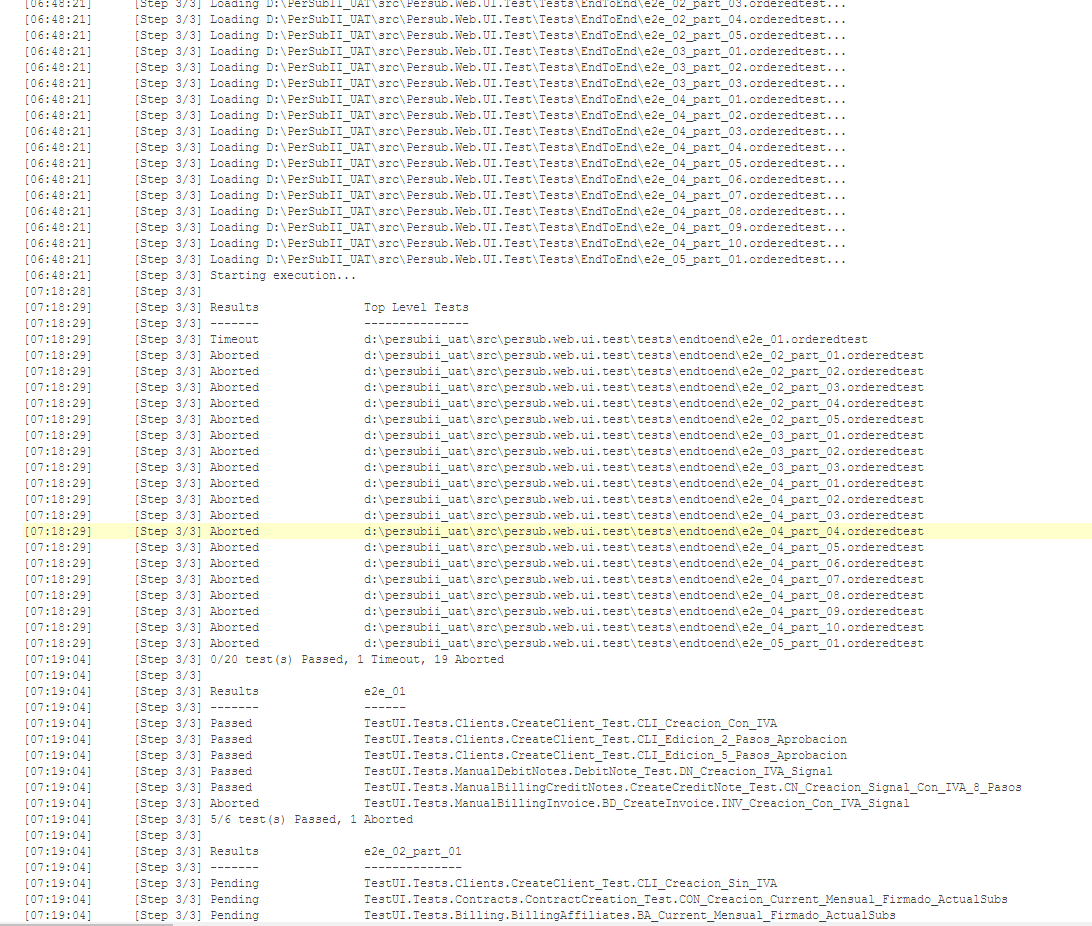
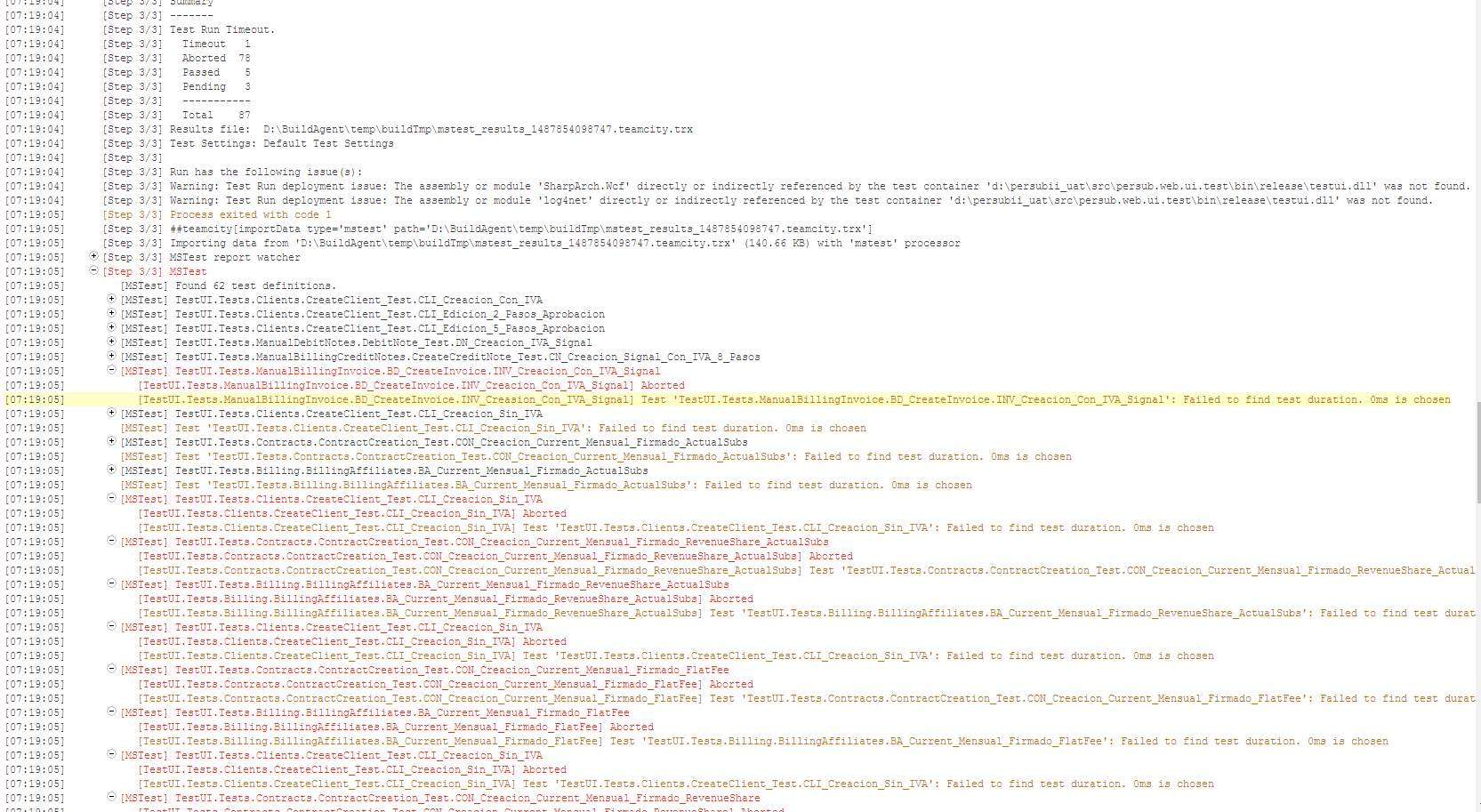
I hope you can help me, Thank you
Please sign in to leave a comment.
Hi Matias,
thanks for your detailed description. Unfortunately, it seems you are misinterpreting the build log. The messages in the second screenshot aren't from the tests themselves, but from the trx test report that is being loaded by teamcity. The tests have been aborted by the test runner, and the "Failed to find test duration" is a message from the report parser indicating that the test duration wasn't specified in the result (because it was aborted, so there wasn't any result in which the duration could be found).
Judging from the first set of results in the first screenshot you show, it seems that one of your tests timed out and all the subsequent ones were aborted. Some test runners have that behavior as default and some others can be configured to run in such a way, so you might want to check the reason they're being aborted. The full build log or the teamcity-agent.log might have more information and stack traces on what happened. If you want us to help with that feel free to send them to us, if you want to keep them private, use the "Submit a Request" button on the top of the page.
Hi Matias,
Unfortunately the teamcity-agent.log didn't log any error. Could you please send the full build log as I had mentioned? This should definitely include the details.
Hi Matias,
thanks for the files. I have been reading through them, and the build log seems to indicate that a number of tests pass or fail, then suddenly for some reason they start to abort. Unfortunately, the reason for the abort is not logged. Maybe the .trx file includes the details on why the test was aborted which we didn't parse, but this would be rare. There seems to be also instances (for example: http://stackoverflow.com/questions/5780592/vs2010-unit-tests-aborting-for-no-reason) where tests Abort without giving a reason to the test runner. This might be happen some system error happens (Such a StackOverflowException)
You might need to publish the .trx file as a build artifact to have it available though, and it's still not guaranteed that the information will be there.
If your local build in your own computer passes all tests, please follow the steps here https://confluence.jetbrains.com/display/TCD10/Common+Problems#CommonProblems-BuildfailsorbehavesdifferentlyinTeamCitybutnotlocally. Maybe there is a difference in the environment configuration leading to this issues.
You could indicate the path of the artifact .trx ?, I add it
It's in your logs:
D:\BuildAgent\temp\buildTmp\mstest_results_1488286504668.teamcity.trx
To publish it as a build artifact, specify it in the "General Settings" tab of the build configuration (instead of that path, you might want to specify something like **\*.trx, then run the build and it will publish the file as a result.
But please, check the rest, check your event log on the build agent for errors as well, check whether running the build on the build agent's environment, but manually works.