[.NET] TeamCity 10.0.4 produces different unit test and coverage results compared to 9.1.x

Hi,
We are in the process of setting up brand new build servers and agents and as part of this journey are going to use the "latest and greatest" available when it comes to components and plugins. As TeamCity 10 also comes with a lot of newer versions of tools, we understand that differences can be expected, however the different in tests and coverage (used by dotCover) are somewhat odd to say the least.
Let me explain.
1) We have a fairly simple project compiled against .NET 4.6.1; now when running the tests inside Visual Studio 2015 using Resharper Ultimate 2016.3.1, we can clearly see that we currently have 243 unit tests, great!
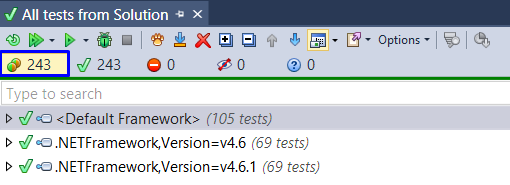 (Note: Why my tests are suddenly grouped in different frameworks is beyond me, as everything is targeting 4.6.1, but not the focus of this report)
2) The coverage filter (using Metarunner xUnit 2.1.0 + dotCover 1.13a) has a fairly generic mask it uses to find tests: Test\**\bin\Release\*.Tests.dll
Since all of our test projects are stored in ./test/<Project.Tests>/ it should pick-up any tests we add as long as we match the above mask, great!
Now when running this build step, we see the following result:
 Well, the numbers themselves are smile worthy, we're on track for a good result, but the amount of tests is 146, so that's a problem (could be something obvious, but currently not clear why). The second issue that raised my eyebrow is the difference with the same build on TeamCity 9.x (using xUnit 2.1.0 + dotCover metarunner 1.1.0):
 So what are we looking at here? Well, the number of tests are the same, but still less than Visual Studio's session, but the statement details are different! Wow really? Yes really!
- We see 376 statements using dotCover 2016.2.2 that came with TeamCity 10.0.4 versus 374 statements using dotCover 10.0.2 that came with TeamCity 9.1.5.
When going deeper into the file that supposedly has a different number of lines, we are looking as visually identical files, with the same amount of lines highlighted in green, at least I think its' supposed to be green since my color identification module in my brain is faulty since birth, so why is dotCover thinking otherwise?
Summary:
To summarize the events and the remarks I have:
- TeamCity 10.0.4 using the dotCover that came with it produces different coverage metrics than TeamCity 9.1.5
- The amount of unit tests run differs from what Resharper Unit Test Runner is showing inside Visual Studio (but that could certainly be my fault)
- Build Log output between 10.x and 9.x is different (e.g. TC10 is not outputting the coverage metrics to its log anymore)
- xUnit + dotCover Meta runner really should be part of default TeamCity installation! :-)
- TeamCity 10 Server is installed completely with default settings on a barebone installation of Windows Server 2016
- TeamCity 10 Agent is installed completely with default settings on a barebone installation of Windows Server 2016 and the necessary .NET Packs to ensure .NET 4.6.1 projects can be build
- The font in TeamCity 9.1.5 was changed to Open Sans, which is better looking, but in case you are wondering why the TC9 screenshots looks so much better
I hope this information is enough to think with me, mainly where do I look for hints and possible indications that could explain these differences? Was something actually changed in the later versions of dotCover? Is there a way to upgrade to the newest version of dotCover, or do I have to wait for a new build of TeamCity?
(BTW: I believe it would be great if the forums posts could have technology tags so it's easier to find .NET related issues with TeamCity but that's just a thought out loud in addition to specifying which version of TC you are posting about)
Hope this helps,
Please sign in to leave a comment.
Hello Jos,
Thank you for you extended feedback :)!
One of the reasons why number of tests may differ is the way how Visual Studio and TeamCity count it. TeamCity distinguishes tests by their names and groups tests with the same name as one test, whereas Visual Studio knows more details about tests (e.g. .NETFramework versions) and thus may count them as different ones.
We do not change dotCover when adding it into Teamcity, you may want to submit a issue to dotCover tracker if you think there is a bug in there.
You can either upgrade or downgrade your dotCover version on your Build Agents by Installing Agent Tools.